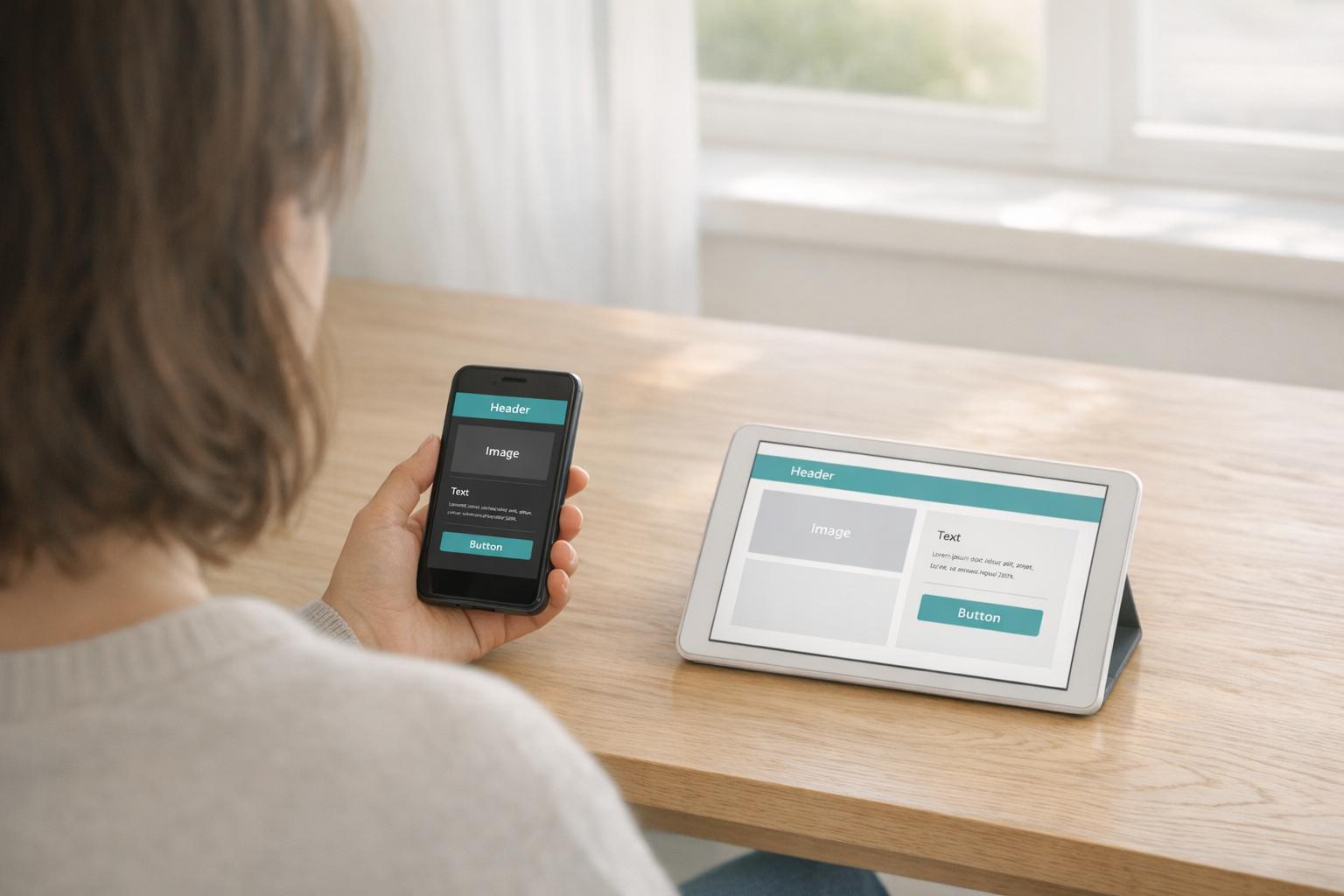
Choosing the right CMS depends on your needs. A traditional CMS combines content management and presentation in one platform, making it easier for non-technical users to manage websites. It's ideal for simple projects like blogs or small business sites. On the other hand, a headless CMS separates content storage from presentation, delivering content via APIs to multiple platforms like websites, apps, and IoT devices. This flexibility supports advanced use cases, scalability, and better performance but requires technical expertise.
Key Takeaways:
- Traditional CMS: Best for single-channel websites with limited technical resources. Examples: WordPress, Joomla.
- Headless CMS: Best for multi-platform content delivery, scalability, and custom designs. Examples: Contentful, Strapi.
Quick Comparison:
| Feature | Traditional CMS | Headless CMS |
|---|---|---|
| Architecture | Monolithic (backend + frontend) | Decoupled (API-driven) |
| Content Delivery | Template-based (HTML) | API-first (JSON/GraphQL) |
| Scalability | Entire system scales together | Frontend and backend scale separately |
| Technical Skills | Minimal required | Advanced development needed |
| Multi-Platform Use | Limited | Designed for omnichannel |
| Security | Higher risk (plugin-based) | Lower risk (API-based backend) |
Headless CMS is better for complex, high-traffic, or multi-platform projects, while traditional CMS works well for simpler, budget-conscious setups.
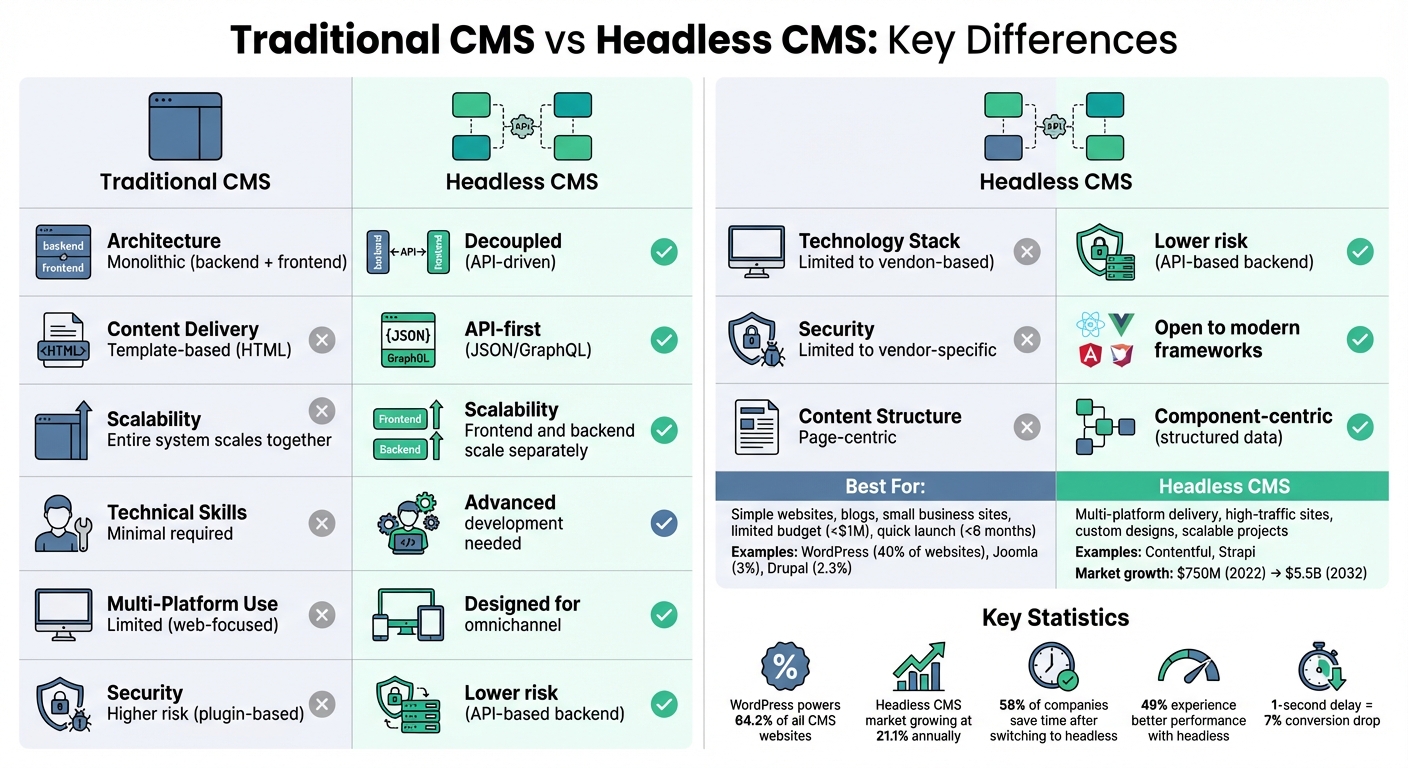
Traditional CMS vs Headless CMS: Complete Feature Comparison
Headless CMS Explained (2026)
sbb-itb-94eacf4
What is a Traditional CMS?
A traditional CMS is an all-in-one system where content management and presentation are tightly integrated within a single application. The backend (used for creating and storing content) and the frontend (what users see) are part of the same codebase. This setup means the platform manages everything - like the database, admin panel, and website design - within one unified environment.
"Traditional Content Management Systems (CMSs) integrate both the backend and the front end into one unified system." - Storyblok
Content is stored in a database and transformed into HTML using pre-built templates, which are optimized for displaying content on a single channel - usually a website. Because the content and design are so interconnected, traditional CMS platforms are primarily geared toward website delivery.
How Traditional CMS Works
Traditional CMS platforms are built with simplicity in mind, often catering to non-technical users. They include features like What You See Is What You Get (WYSIWYG) editors and drag-and-drop tools, which make it easy for content creators to design and manage pages without needing to write code. This user-friendly editing interface lets you see how your content will look on the live site as you work on it.
However, this simplicity comes with trade-offs. Since the backend and frontend are tightly linked, making changes to the content structure usually requires adjustments to the templates as well - something that often requires technical expertise.
Common Traditional CMS Platforms
WordPress leads the pack in the traditional CMS world, powering about 40% of all websites globally. It’s widely used for blogs, small to medium business websites, and a variety of general-purpose sites and professional website builders.
Joomla accounts for around 3% of websites, while Drupal - used by approximately 2.3% of websites and holding a global market share of roughly 4.6% - is a popular choice for large, content-heavy enterprise sites. Other platforms, like Magento (focused on e-commerce) and Umbraco (a favorite in developer-centric .NET environments), also follow the same monolithic model where content management and presentation are inseparable.
Next, we’ll take a closer look at how headless CMS platforms break away from this structure and offer a different approach.
What is a Headless CMS?
A headless CMS is a backend-focused content management system that separates content storage from its presentation. Unlike traditional CMS platforms, where the backend and frontend are tightly connected, a headless CMS removes the "head" (the presentation layer). It focuses solely on managing and storing content as structured data, which can then be delivered to any digital platform through APIs like REST or GraphQL.
The term "headless" reflects this design - there’s no built-in frontend or pre-designed templates. Instead, content is stored in formats such as JSON or XML, making it adaptable to various devices and platforms. This flexibility allows the same content to appear seamlessly on websites, mobile apps, smartwatches, IoT devices, or voice assistants without needing reformatting.
"The traditional CMS didn't provide an ideal way to use our developer resources, because we want them to focus on the technical improvement of the website." - Andre Lang, Head of Development, Cheil at Samsung
Big names like Google, Tesla, Netflix, IKEA, and Spotify use headless CMS architecture to manage their digital experiences. The headless CMS market is expected to grow from $750 million in 2022 to $5.5 billion by 2032, with an annual growth rate of 21.1%.
Let’s explore how this system works and why it’s so efficient.
How Headless CMS Works
A headless CMS operates through an API-driven model, where content flows from the backend to any frontend developers choose. Its core components include a content repository, an API gateway, an admin panel, and a CDN or caching layer for better performance.
When content is created in a headless CMS, it’s stored as structured data. Developers can then use API calls to fetch and display this content wherever needed. High-performing systems often achieve API response times under 100 milliseconds, with CDN cache hit ratios exceeding 90%.
This "create once, publish everywhere" approach eliminates the need to duplicate content across multiple platforms. For instance, in September 2023, GetYourGuide adopted Contentstack's headless CMS to manage content for over 500,000 daily users. This shift allowed them to deliver personalized content across channels over 90% faster compared to their previous monolithic setup.
Developers also appreciate the freedom to use modern frameworks like React, Vue, Next.js, or Angular, bypassing the proprietary templating languages required by traditional systems such as PHP for WordPress or Liquid for Shopify.
Advantages of Separated Content Delivery
Separating content management from presentation offers numerous benefits:
- Multi-channel delivery: Content can easily be distributed across websites, mobile apps, digital signage, and other platforms.
- Independent scalability: Frontend and backend systems can scale separately. For example, during high-traffic events, you can scale the presentation layer without impacting the backend, ensuring smoother performance.
- Improved security: With the backend hidden and accessed only via APIs, the attack surface is significantly reduced. This is especially crucial as nearly 30% of critical WordPress plugins have missed necessary security updates.
- Future-proof content: Since content is stored in an agnostic format, redesigning frontends or adopting new technologies doesn’t require migrating the existing content database.
- Modular design: Companies can create thousands of unique pages using just a handful of pre-styled sections. For example, a headless setup can generate over 1,000 unique pages from only 15 modular sections.
These advantages highlight why so many organizations are embracing this architecture for their content needs.
Architecture Differences Between Traditional and Headless CMS
The key distinction between traditional and headless CMS lies in their underlying architecture. Traditional CMS platforms rely on a monolithic structure, where the backend (content management) and frontend (presentation layer) are tightly interwoven. This setup combines content, templates, themes, and display code into a single system.
In contrast, headless CMS uses a decoupled architecture. It separates the backend (content repository) from the frontend (presentation layer). This design focuses exclusively on storing and managing content, leaving the presentation layer to be developed with any technology of your choice. Communication between the two happens through APIs, rather than being directly linked.
This separation fundamentally alters how content is delivered. Traditional CMS platforms rely on predefined templates and themes, meaning you're often confined to the framework provided. On the other hand, headless CMS delivers content as structured data - typically in JSON or XML format. This approach stores content as reusable data, unbound by fixed page layouts, enabling distribution across various platforms like websites, mobile apps, IoT devices, and AI-driven tools.
"Traditional CMSes face a fundamental problem in the AI era: they were built for pages, not for structured data." - Joe Holmes, Software Developer and Technical Writer, Sanity
Traditional systems also tether developers to vendor-specific technology stacks, while headless CMS offers technology freedom. In a headless setup, the frontend is independent, allowing developers to use modern frameworks like React, Vue, Next.js, or Angular. Furthermore, traditional CMS is primarily web-focused, supporting single-channel delivery, whereas headless CMS is designed for omnichannel distribution from the ground up.
Comparison Table: Traditional vs Headless CMS
| Feature | Traditional CMS | Headless CMS |
|---|---|---|
| Architecture Type | Monolithic (Tightly Coupled) | Decoupled (Separated Backend) |
| Content Delivery | Template-driven (HTML) | API-driven (JSON/GraphQL) |
| Frontend/Backend Connection | Intertwined; changes to one affect the other | Independent; frontend can evolve separately |
| Technology Stack | Limited to vendor-specific stacks | Open to modern frameworks of choice |
| Content Structure | Page-centric (content tied to presentation) | Component-centric (structured, reusable data) |
| Distribution Channels | Web-first (single channel) | Omnichannel (web, mobile, IoT, AI tools) |
| Scalability | Entire system must scale together | Frontend and backend scale independently |
| Security | Higher risk (plugins increase attack surface) | Lower risk (content repository hidden from frontend) |
These architectural differences significantly affect how flexible, scalable, and secure each system is - key considerations when deciding which CMS best suits your needs. The separation in headless systems provides a foundation for greater adaptability and growth potential.
Flexibility and Scalability
Customization and Technology Options
Traditional CMS platforms often confine users to rigid templates and themes, making customization tricky and forcing reliance on plugins and extensions. This approach can lead to bloated applications and increased security vulnerabilities. In fact, studies reveal that nearly 30% of critical WordPress plugins fail to receive necessary security updates.
A headless CMS, on the other hand, offers a language-agnostic framework, enabling developers to work with modern technologies like React, Vue, Next.js, or Sveltekit instead of being restricted to proprietary languages like PHP. This flexibility also extends to integrations. Instead of relying on plugins, headless systems take an API-first approach, allowing seamless connections to top-tier third-party services for search, analytics, authentication, and localization - without adding unnecessary bulk to your system.
"A headless CMS gives you full control of the HTML and JavaScript on each page, allowing you to create highly optimized, lightweight websites and apps." - Karen McGrane, Senior Director, Customer Insights & Adoption, Contentful
The advantages become even clearer when considering omnichannel delivery. Traditional CMS platforms are primarily designed for websites, while a headless CMS separates content from its presentation. This approach allows you to deliver the same content to mobile apps, IoT devices, smartwatches, and voice assistants - all from a single repository.
This level of customization also supports scalable deployment, a critical feature for businesses aiming to grow.
Scaling for Business Growth
Scaling with traditional CMS platforms can be inefficient, as the entire monolithic system must scale during traffic surges. In contrast, headless architecture allows for independent scaling of frontend and backend components. This means you can focus resources where they’re needed most - for instance, scaling the API layer during a product launch - without disrupting the content repository.
"Headless CMSes are inherently scalable. This allows you to adapt to evolving business needs and handle high-traffic periods such as Black Friday or a page on your site going unexpectedly viral." - Karen McGrane, Senior Director, Customer Insights & Adoption, Contentful
With content delivered via APIs and CDNs, headless platforms significantly reduce server load and enhance response times for audiences worldwide. Traditional systems often struggle to achieve these benefits without major infrastructure upgrades, making headless solutions a more efficient choice for global scalability.
Performance, Security, and Technical Requirements
Performance and Loading Speed
Traditional CMS platforms often struggle with performance due to their monolithic design. Every page request triggers full server-side HTML rendering, and the added weight of plugins and themes only makes things worse. This inefficiency can have a real impact: a one-second delay in page load time can lead to a 7% drop in conversions, 11% fewer page views, and a 16% dip in customer satisfaction. That’s a lot to lose over a few extra seconds.
Headless CMS flips this script. Developers can create lightweight, optimized frontends, fully controlling the HTML and JavaScript without the bloat of traditional templates. Content is delivered as raw data through APIs, which can be cached globally using CDNs to ensure data is closer to users. Modern tools like Next.js even allow pre-rendered pages, providing near-instant server responses. This streamlined approach not only improves speed but also sets the foundation for stronger security and better technical management.
Security Considerations
Security is a major pain point for traditional CMS platforms, largely due to third-party plugins. These plugins are often outdated or poorly maintained, making them easy targets for hackers. For example, WordPress sites faced 90,000 brute force attack attempts per day back in April 2013. With exposed login URLs and tightly coupled architectures, traditional systems are prime targets for cyberattacks.
"In the case of a Headless CMS, the attacker will have to find out what CMS was used to analyze the frontend, and then they will have to guess an admin's email address. The hacking process is longer, making it harder to automate." - Christian Zoppi, Storyblok
Headless CMS architecture minimizes these risks by separating the backend from the frontend. Even if vulnerabilities exist in the CMS, they don’t directly compromise the entire website. API-driven content delivery reduces risks like SQL injection or cross-site scripting by limiting database access. Plus, SaaS-based headless providers often handle security updates, DDoS protection, and patches automatically, while traditional CMS users must manage these tasks themselves.
Technical Skills Required
The technical demands of a CMS can be a deciding factor, especially when considering the skill level of your team. Traditional CMS platforms are beginner-friendly, offering bundled backends and frontends with user-friendly site builder tools and WYSIWYG editors. You can pick a template, install it, and start publishing content in no time - no coding required. This accessibility is a hallmark of essential tools for website creation designed for rapid deployment.
Headless CMS, on the other hand, requires a more advanced skill set. Since it doesn’t include a built-in frontend, developers need to create the presentation layer from scratch using modern frameworks like React, Vue, or Angular. They then connect this custom frontend to the CMS using REST or GraphQL APIs. While this approach has a steeper learning curve, it gives skilled teams far more flexibility and control.
Maintenance also differs significantly. Traditional CMS platforms require manual updates for core software, plugins, and themes to stay secure. In contrast, headless SaaS providers handle backend maintenance automatically. However, developers still need to manage and update the custom-built frontend. Despite these challenges, 58% of companies reported saving time on content management tasks, and 49% experienced better performance with faster loading times after switching to headless solutions.
When to Use Traditional CMS vs Headless CMS
Best Scenarios for Traditional CMS
Platforms like WordPress, Joomla, and Drupal shine when it comes to straightforward, web-focused projects. For personal blogs, small business websites, or corporate sites with basic presentation needs, a traditional CMS simplifies the process. WordPress alone powers a staggering 64.2% of all websites that rely on content management systems, underscoring its ease of use, minimal technical barriers, and an extensive library of pre-designed templates.
Budget and timeline often dictate the choice here. If you're working with a budget under $1 million, a timeline of less than six months, and online revenue below $20–$50 million, a traditional CMS is a practical and efficient option. Its out-of-the-box themes and user-friendly WYSIWYG editors make it easy for non-technical team members to manage content, keeping operational costs low.
"Traditional CMS still has a strong place. When requirements are stable, channels are limited, and speed to delivery is critical, an all-in-one approach can be both efficient and cost-effective."
That said, for projects with more complex digital roadmaps or omnichannel ambitions, a headless CMS might be a better fit.
Best Scenarios for Headless CMS
Headless CMS, built on a decoupled architecture, excels when content needs to be delivered across multiple platforms. If your plans include mobile apps, smartwatches, digital signage, or AI-driven experiences within the next 12–24 months, a headless CMS can save you from expensive future migrations [2,5]. For instance, Samsung adopted a headless CMS to overcome the limitations of traditional systems in supporting their omnichannel delivery strategy.
For high-performance projects, headless CMS offers distinct advantages. Running a high-traffic eCommerce site, especially during events like Black Friday, requires a setup that can scale both the frontend and backend independently [2,5]. Pairing a headless CMS with Static Site Generation can also deliver the speed necessary to meet modern Core Web Vitals standards, directly influencing search rankings and conversion rates.
However, using a headless CMS demands a skilled team familiar with frameworks like React, Vue, or Next.js. With the right expertise, it provides unparalleled flexibility, enabling you to craft custom user experiences without being restricted by pre-built templates or plugins. This makes it a strong choice for ambitious projects requiring bespoke designs, intricate integrations, or AI-driven personalization - treating content as structured data rather than locking it into static page layouts [13,6].
Conclusion
Selecting the right CMS depends on your project needs, technical expertise, and long-term goals. For simpler websites with tight budgets and teams lacking dedicated developers, traditional platforms like WordPress are a solid choice. They provide pre-built themes and user-friendly visual editors, making it easy for non-technical users to publish content. However, they often fall short when it comes to delivering content across multiple channels and can face security risks due to plugin vulnerabilities.
On the other hand, headless CMS platforms excel in delivering content to various platforms, such as mobile apps, IoT devices, kiosks, or AI-driven experiences. Their decoupled architecture allows the frontend and backend to scale independently, which is especially useful for handling high-traffic events like Black Friday sales in eCommerce. By structuring content as data instead of static pages, headless CMS platforms also support AI automation and modern workflows.
If your team lacks advanced technical skills, a traditional CMS might be the better option due to its straightforward setup. But for those with the expertise and a need for custom, unrestricted designs, a headless CMS provides unmatched flexibility. Security and performance considerations should also weigh heavily in your decision-making process.
Your timeline matters, too. A traditional CMS allows for a quicker launch with minimal setup, while a headless CMS requires more upfront development effort. However, the investment often pays off with easier migrations and better content reuse down the line. Some modern platforms even offer hybrid solutions that combine visual editing tools with API-first capabilities , offering a balance between simplicity and flexibility.
FAQs
Can I switch from a traditional CMS to a headless CMS later?
Yes, moving from a conventional CMS to a headless CMS can be done. It involves careful planning, migrating content, and adapting workflows to fit the new system. Thankfully, there are plenty of guides and established practices to assist with the process. This shift is often driven by the desire for a more flexible and adaptable content management approach.
What does “API-first” mean in a headless CMS?
In a headless CMS, the term “API-first” means the backend is designed with APIs as the primary focus. This setup allows content to be seamlessly delivered to any platform or device. By decoupling content management from its presentation, this approach ensures greater flexibility and scalability, making it simpler to tailor content for a variety of needs.
Do I need developers to run a headless CMS?
You don’t always need a team of developers to work with a headless CMS, but having technical know-how can make a big difference - especially during setup and for ongoing management. Tasks like connecting APIs or handling deployments across multiple platforms often call for developer expertise. That said, many headless CMS providers now include user-friendly features aimed at non-technical users. However, for more intricate setups or advanced workflows, bringing in developers is usually the best way to get the most out of the system.