Patch management is the process of updating your website's software - like CMS, plugins, themes, and server applications - to fix security gaps, bugs, and improve performance. Without it, your site is vulnerable to cyberattacks, downtime, and legal penalties. Here's why it matters:
- Security: Hackers exploit unpatched vulnerabilities. For example, 76% of ransomware attacks in 2022 targeted known flaws with available fixes.
- Stability: Updates prevent crashes, slowdowns, and broken features, ensuring smooth functionality.
- Compliance: Regulations like PCI DSS and GDPR require timely patching, with non-compliance leading to fines or failed audits.
Neglecting patch management can lead to breaches, like the Equifax incident, which cost $2 billion. Learn how to safeguard your website through proper patching practices, from prioritizing updates to using automation tools effectively.
Cybersecurity 101: Demystifying Patch Management
sbb-itb-94eacf4
How Patch Management Protects Your Website
Patch management isn’t just about keeping your software updated - it’s about safeguarding your website in three key areas: security, stability, and legal compliance. Each update you apply strengthens your defenses against threats, ensures smooth functionality, and helps you meet industry regulations. Let’s take a closer look at how patch management tackles these challenges.
Fixing Security Vulnerabilities
Every patch is an opportunity to close potential loopholes in your CMS, plugins, or themes. These vulnerabilities often arise from coding errors or design oversights and can be exploited in various ways:
- SQL Injection: Attackers exploit form plugins to access and steal database information.
- Cross-Site Scripting (XSS): Malicious scripts can run on visitor browsers through weaknesses in page builders.
- Privilege Escalation: Membership modules can be manipulated to grant unauthorized admin access.
Real-world examples, like vulnerabilities in widely-used CMS plugins or issues with Drupal, highlight just how quickly these flaws can be exploited - sometimes within hours of a patch being announced. Automated bots are constantly on the lookout for unpatched systems, uploading malicious files, creating unauthorized admin accounts, and compromising websites worldwide.
If a patch isn’t immediately available, a Web Application Firewall (WAF) can act as a temporary shield. By blocking exploit attempts at the network level, it provides "virtual patching" until you can implement the official fix.
Improving Website Stability
Patching isn’t only about security - it’s also about keeping your website running smoothly. Updates address bugs that cause crashes, slowdowns, and broken features. They can also optimize server resource usage, reducing load and improving uptime. By keeping your CMS, plugins, themes, and hosting environment current, you avoid common issues like:
- Forms that fail to submit
- Images that refuse to load
- Pages that crash unexpectedly
Patches also help prevent downtime caused by attacks like Denial-of-Service (DoS) or ransomware, which can take your website offline entirely. And let’s not forget SEO - search engines penalize sites that are outdated, slow, or unstable, so patching helps maintain your rankings.
Meeting Regulatory Requirements
If your website handles sensitive data, patch management isn’t optional - it’s a legal obligation. Regulations like PCI DSS (for payment card data), HIPAA (for healthcare data), and GDPR (for European user data) enforce strict patching timelines. For instance, PCI DSS requires security patches to be applied within 30 days of their release.
Failing to comply with these rules can result in hefty penalties. For example:
- PCI DSS violations can cost $5,000 to $100,000 per month.
- HIPAA breaches can lead to fines of up to $1.5 million annually.
Beyond fines, non-compliance can lead to failed audits, loss of certifications, and even the termination of enterprise contracts. Patching ensures you close vulnerabilities that attackers could exploit for lateral movement, privilege escalation, or data theft. As the Cybersecurity and Infrastructure Security Agency (CISA) puts it:
"New vulnerabilities are continually emerging, but the best defense against attackers exploiting patched vulnerabilities is simple: keep your software up to date."
How to Implement Patch Management for Your Website
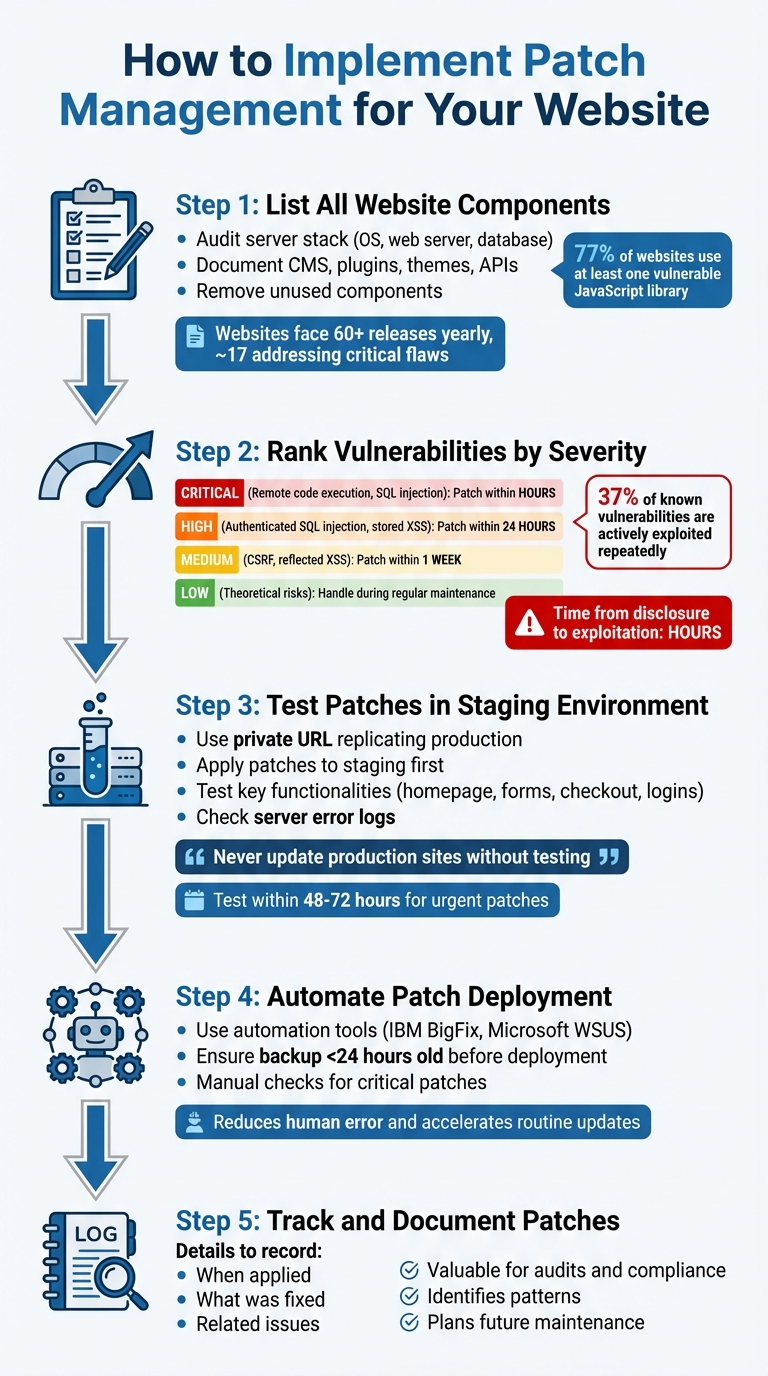
5-Step Patch Management Implementation Process for Website Security
Implementing patch management involves a series of repeatable steps to ensure your website stays secure and aligns with your broader security objectives. Here's how to get started:
Step 1: List All Website Components
Begin by auditing every piece of technology that makes up your website, including your website building tools. This includes your server stack - the Operating System (Linux or Windows), Web Server (Apache or Nginx), and Database (MySQL or MariaDB). Beyond that, document your CMS, plugins, themes, front-end libraries, and any third-party APIs.
Pay special attention to plugins and add-ons. Studies show that 77% of websites use at least one vulnerable JavaScript library. Eliminate any unused plugins or themes, as they only add unnecessary security risks.
"The real world is a messy place; there's nothing we can do about that but be vigilant." - Todd Peters, Website Upgrade and Patching Blog
Websites can face over 60 releases in a year, with around 17 of those addressing critical security flaws. By documenting all dependencies, you reduce the risk of breaking your site during updates.
Step 2: Rank Vulnerabilities by Severity
Not all vulnerabilities require immediate action. Here's a breakdown of how to prioritize:
- Critical vulnerabilities (e.g., remote code execution, unauthenticated SQL injection): Patch these within hours.
- High-priority issues (e.g., authenticated SQL injection, stored XSS): Address these within 24 hours.
- Medium-level vulnerabilities (e.g., CSRF, reflected XSS): Aim to patch these within a week.
- Low-priority issues (e.g., theoretical risks): Handle these during regular maintenance.
The time between a vulnerability being disclosed and actively exploited is often just hours. Stay on top of security advisories and changelogs, looking for terms like "security fix" or "SQL injection." After addressing privilege escalation vulnerabilities, audit your user database to check for unauthorized admin accounts - 37% of known vulnerabilities are actively exploited repeatedly.
Before deploying any updates, always validate them in a controlled environment.
Step 3: Test Patches in a Staging Environment
Never apply updates directly to your live website. Instead, use a staging environment - a private URL that replicates your production setup, including server configurations, up-to-date database files, and matching software versions. Block search engines from indexing this environment to avoid duplicate content issues.
Follow these steps:
- Refresh the staging environment with a recent copy of your production site.
- Apply patches to the staging environment first.
- Test key functionalities like the homepage, navigation menus, form submissions, e-commerce checkout, and user logins.
- Check server error logs to catch any hidden issues.
"Never update production sites without testing." - NoCodeVista
Schedule updates midweek when your team is available to troubleshoot. Even urgent patches for actively exploited vulnerabilities should undergo quick staging tests, ideally within 48–72 hours.
Step 4: Automate Patch Deployment
Once patches clear staging tests, automation tools can simplify deployment while reducing human error. Consider tools like IBM BigFix or Microsoft WSUS to streamline updates. Automation accelerates routine updates but doesn't eliminate the need for oversight.
Before deploying, ensure you have a recent backup (less than 24 hours old) so you can restore your site if needed. For critical patches, manual checks may still be necessary to confirm everything is implemented correctly.
Step 5: Track and Document Patches
Keep detailed records of all patches, including when they were applied, what they fixed, and any related issues. This documentation is invaluable for audits and compliance. It also helps you identify patterns in your update process and plan for future maintenance.
Common Patch Management Problems and Solutions
Even with a solid patch management plan in place, challenges can still arise. These hurdles are part of the reality that every website owner faces. Here’s how to tackle some of the most common issues.
Handling Compatibility Issues
Patches can sometimes clash with highly customized themes, core files, or plugins. This leads many site owners to delay updates, worried they might disrupt functionality.
One effective approach is virtual patching, which uses a Web Application Firewall (WAF) to block malicious traffic before it reaches your site. This is particularly helpful for websites with altered core files that can’t be updated without breaking custom features.
"The virtual patch works since the security enforcement layer analyzes transactions and intercepts attacks in transit. This means malicious traffic never reaches the web application." - OWASP
Another option is phased rollouts. By testing patches on a small group of systems first, you can identify any conflicts early on. For example, ConnectWise NOC experts test Windows OS security updates on over a million endpoints monthly to ensure their stability. If a patch fails due to dependencies or conflicts, modern automation tools can retry the deployment and handle common issues without manual effort.
From there, focus on scheduling updates to minimize disruptions.
Reducing Downtime During Updates
Applying patches during peak hours can frustrate visitors and hurt revenue. To avoid this, schedule updates during off-peak times and stick to the "No-Friday" rule - don’t roll out major updates on Fridays or just before holidays, so your team is available to address any problems.
For those managing multiple sites, update in small batches of two or three sites per day instead of all at once. This minimizes the impact if something goes wrong. Always keep a verified backup from the last 24 hours and document your restoration process, so you can quickly undo changes if necessary.
When it comes to critical security patches, speed is crucial. Aim to apply these within 48–72 hours, even if it means accepting some risk. This is especially important since the average time for an exploit to be publicly released is just six days, while organizations often take 55 days to patch vulnerabilities.
For situations where vulnerabilities can’t be patched, alternative strategies are essential.
Managing Unpatchable Vulnerabilities
Certain vulnerabilities can’t be fixed because the software is outdated or updating would break essential functionality. Alarmingly, 76% of ransomware attacks in 2022 exploited known vulnerabilities announced between 2010 and 2019.
In these cases, compensating controls can safeguard your website. For example, network segmentation isolates vulnerable systems on separate VLANs, preventing attackers from spreading if one system is breached. Combine this with strict access controls, like MFA and least privilege policies, to restrict who can access these systems.
Tools like behavioral analytics and Intrusion Detection Systems (IDS) can help identify suspicious activity targeting unpatchable systems. For legacy systems that must stay operational, maintain an up-to-date inventory, conduct formal risk assessments, and have the system owner sign off on the risks. Regularly reassess these systems to determine if they can be retired, upgraded, or if new fixes have become available.
Patch Management Best Practices
After understanding the challenges of patch management, it’s time to focus on strategies that can bolster your website’s security for the long haul.
Use Automation Tools
Keeping up with the speed of modern threats is nearly impossible with manual patching. In fact, 60% of data breaches are tied to vulnerabilities that had available patches but weren’t applied in time. Automation addresses this issue by drastically cutting patching timelines - reducing the mean time to patch from over 30 days to less than a week.
Automated tools not only minimize human error but also support staged rollouts and free up IT resources. They can reclaim as much as 50% of a full-time employee’s time, allowing teams to focus on more strategic priorities instead of routine tasks.
For website owners, it’s crucial to choose an automation tool that goes beyond operating system updates. For example, 52% of WordPress vulnerabilities are linked to plugins, while 37% target the core CMS. Tools like Pantheon’s Autopilot can automatically detect and apply updates for WordPress and Drupal core, plugins, and themes. Some platforms even offer Visual Regression Testing (VRT), which captures screenshots before and after updates to highlight any layout disruptions caused by patches.
Create a Regular Update Schedule
A consistent update schedule is key to preventing vulnerabilities from accumulating. Weekly updates, for instance, mean 52 rounds of patches annually, compared to just 12 with monthly updates. This tighter schedule shortens the window of exposure, especially since the median time from vulnerability disclosure to exploitation is only about five hours.
Structure your updates by urgency:
- Critical security patches and vulnerabilities listed in the CISA Known Exploited Vulnerabilities (KEV) catalog should be addressed within 24–48 hours.
- Routine plugin and theme updates can be bundled into a weekly maintenance window, ideally mid-week (Tuesday or Wednesday) to avoid weekend downtime.
- Major core updates or changes affecting databases should undergo 1–2 weeks of testing in a staging environment before live deployment.
"Weekly updates mean 52 rounds of security and performance patches per year. Monthly updates mean 12. That is not a small difference." – Shane Larrabee, FatLab Web Support
Enable automatic updates for minor releases (like WordPress x.x.1 versions), as they are typically low-risk and non-disruptive. However, avoid using the "Update All" option for major upgrades - handle these individually to identify and resolve any breaking changes. Additionally, conduct an annual audit to remove outdated plugins that haven’t been updated in over a year, as they pose unpatchable risks.
Use AI to Prioritize Risks
With thousands of vulnerabilities reported each month, prioritizing which ones to address can be overwhelming. AI can help cut through the noise by focusing on the vulnerabilities that pose the greatest risk. While traditional CVSS scores indicate potential impact, they don’t reflect active exploitation. AI tools analyze real-time threat intelligence to identify the small percentage of vulnerabilities that attackers are actively targeting.
Nearly 39% of cybersecurity professionals find it challenging to prioritize risk remediation and patching. AI tools simplify this process by incorporating the Exploit Prediction Scoring System (EPSS), which predicts the likelihood of a vulnerability being exploited within 30 days. These tools also flag vulnerabilities listed in the CISA KEV catalog for immediate action, helping organizations meet regulatory remediation timelines of 7–21 days.
"If you're using a risk-based prioritization system, AI can pull in massive amounts of information from a variety of different sources and tools, analyze that information and use predictive models to make risk-based scoring as efficient as possible." – Chris Goettl, Vice President of Product Management, Endpoint Security, Ivanti
To make AI-driven tools even more effective, ensure they receive high-quality data by addressing visibility gaps and integrating live threat feeds. AI can also test patches in sandbox environments before deployment, catching compatibility issues that could cause downtime. By considering both asset importance and active exploitation trends, AI enables IT teams to rank risks more strategically.
Conclusion
Patch management acts as the cornerstone of your website's defense against cyber threats. By addressing vulnerabilities, you effectively seal off the entry points that attackers often exploit. Consider this: nearly 80% of successful cyberattacks could be avoided with timely patching, and 60% of breached organizations admit the attack stemmed from a known, unpatched vulnerability.
Beyond security, proper patch management ensures smoother operations. It tackles bugs, memory leaks, and compatibility hiccups, reducing the risk of downtime or system crashes. Plus, it keeps you aligned with key regulations like PCI DSS (requiring patches within 30 days), GDPR (with penalties reaching up to €20 million for non-compliance), and HIPAA.
"When patching is elevated to a business function, leaders stop treating it as IT maintenance and start seeing it as risk reduction." – Brandyn Fisher, Senior Penetration Testing Technical Lead, Centric Consulting
FAQs
How do I know which updates are truly urgent?
To keep your systems secure, focus on applying patches that resolve critical vulnerabilities, such as zero-day exploits or flaws actively being used by attackers. Hotfixes, which are released outside the usual update schedule, often address urgent problems and should be implemented right away. Security patches targeting known vulnerabilities with published CVEs, particularly those under active exploitation, are equally important. Stay on top of vulnerability reports and CVE disclosures to quickly identify updates that demand immediate attention.
What should I test in staging before patching live?
Before applying updates to your live website, it's crucial to thoroughly test everything in a staging environment. Here's what to focus on:
- Core functionality: Double-check that all key features and workflows operate as expected without any hiccups.
- Compatibility issues: Look for any conflicts with plugins, integrations, or other dependencies.
- Performance checks: Make sure the update doesn’t cause slow loading times or affect responsiveness.
- Security and stability: Confirm that the patch doesn’t introduce new vulnerabilities or create instability.
- User experience: Ensure the design, layout, and overall usability remain consistent and intact.
Taking the time to test in staging helps reduce risks and ensures a smoother transition when deploying updates to your live site.
What can I do if I can’t patch a vulnerability right away?
If addressing a vulnerability right away isn’t possible, virtual patching can act as a temporary shield. This method creates an additional security layer to block potential attacks without modifying the original code. Alongside this, make it a habit to perform regular vulnerability assessments and keep an eye out for emerging threats. These measures can help safeguard your website until a permanent solution is in place.