When securing a headless CMS, the focus is on protecting APIs, managing access, and encrypting data to reduce risks. Key strategies include:
- Authentication & Access Control: Use Multi-Factor Authentication (MFA) and Role-Based Access Control (RBAC) to limit access.
- API Security: Protect API keys, use token-based authentication (OAuth 2.0 or JWT), and enforce HTTPS for all communications.
- Data Encryption: Encrypt data at rest with AES-256 and in transit using SSL/TLS.
- Monitoring & Alerts: Set up activity logs, real-time alerts, and conduct regular security audits.
- Tools: Leverage Web Application Firewalls (WAFs), API gateways, and vulnerability scanners like Cloudflare, AWS WAF, and Qualys.
These measures reduce vulnerabilities, protect sensitive data, and ensure compliance with regulations like GDPR. By implementing these practices, you can safeguard your CMS and maintain trust in your digital operations.
Headless CMS Transformation: Enhancing Scalability & Security
Authentication and Access Control Best Practices
When it comes to securing your headless CMS, strong authentication and access control mechanisms are non-negotiable. Authentication ensures the right people are accessing your system, while access control limits what they can do once inside. Together, they form a solid defense against the majority of unauthorized access incidents - a major concern given that insider threats account for 60% of data breaches.
Role-Based Access Control (RBAC)
Role-Based Access Control (RBAC) simplifies permission management by assigning access based on roles rather than individual users. For example, instead of granting permissions user by user, you can create roles like Admin, Editor, Contributor, or Subscriber and assign users accordingly. This approach aligns with the principle of least privilege, ensuring users only access what they need to perform their tasks.
A great real-world example comes from Sky Group, which adopted Contentstack's headless CMS in June 2024. By leveraging modular blocks and tightly defined user roles, they managed to streamline multi-regional updates without compromising security.
Modern headless CMS platforms allow for detailed, micro-level permissions. You can define specific rights - such as create, read, update, or delete - for individual content types or API endpoints. For instance, an editor might have publishing capabilities for blog posts but only read-only access to product pages, offering a level of precision uncommon in traditional CMS systems.
Regular audits of access rights are essential, especially when employees leave or change roles. Alarmingly, 49% of tech employees admit to engaging in data breach activities when exiting a job or after dismissal. Scheduling quarterly reviews to revoke unneeded permissions ensures access stays relevant and secure.
How to Implement Multi-Factor Authentication (MFA)
Multi-Factor Authentication (MFA) adds an extra layer of security by requiring a second verification step beyond passwords. Even if credentials are stolen, attackers can't proceed without the additional factor - commonly a code sent via SMS, email, or a dedicated app. As Loggd aptly puts it:
Multi-Factor Authentication (MFA) is the most effective countermeasure. While it doesn't prevent brute-force attempts, it renders them effectively useless. Even a compromised password cannot grant access without the second factor.
To maximize MFA effectiveness, use cryptographically secure generators for codes. Numeric codes should be at least 8 digits, while alphanumeric codes should have at least 6 characters. Set expiration times between 15 minutes and 24 hours, and avoid easily confused characters like 0, O, 1, I, and l to reduce user errors. Codes should also be single-use, invalidating immediately after verification.
For example, Weaveworks transitioned from WordPress to Contentstack in 2024, introducing MFA for admin accounts and defining granular user roles. This not only boosted their publishing speed by 75% but also led to a 50% increase in content delivery while maintaining a secure workflow.
To counter brute-force attacks, implement a limit of 10 failed login attempts within 10 minutes. This prevents attackers from exhausting resources through repeated password hashing attempts.
How to Secure API Keys and Tokens
API keys and JSON Web Tokens (JWT) are essential for authenticating communication between your frontend and backend. However, mishandling these credentials can open the door to significant vulnerabilities.
Best practices for managing API keys:
- Never hardcode API keys in client-side code or commit them to version control systems. Instead, store them as environment variables on your server and route requests through a backend that appends the credentials before contacting the CMS.
- Avoid including API keys in URL query parameters, as these can be exposed through browser history, server logs, or URL scans. Use HTTP headers like
Authorizationorx-api-keyinstead.
For JWTs:
- Use short-lived tokens that expire within minutes or hours to limit exposure.
- Always verify key claims like
alg(algorithm),iss(issuer), andaud(audience) to prevent token manipulation. Block "none" algorithm attacks by maintaining an allow-list for algorithms.
As Michał Trojanowski from Curity advises:
The resource server should always check the aud claim and verify that the token was issued to an audience that the server is part of.
Regularly rotate API keys and delete those no longer in use to reduce risk. Assign unique keys to specific applications or team members, restricting permissions to only the resources they need. Additional safeguards, like IP whitelisting or geo-restrictions, can further limit where keys are valid.
For sensitive media, use time-limited signed URLs to grant temporary access. When working with webhooks, validate payload authenticity using cryptographic signatures to guard against spoofing attempts.
Data Encryption for Headless CMS
After establishing strong authentication protocols, encryption serves as another crucial layer of defense for safeguarding both stored and transmitted data.
Encryption secures your content in two key scenarios: when it's stored (referred to as "at rest") and while it's being transmitted ("in transit"). With the rising costs associated with data breaches, encryption has become a non-negotiable part of securing digital systems.
Headless CMS platforms, which rely extensively on APIs to distribute content across devices and platforms, are particularly vulnerable without encryption. Unprotected communication channels can be intercepted, making encryption essential for maintaining confidentiality and data integrity. Additionally, many businesses must comply with regulations like GDPR, which mandate the use of encryption.
| Encryption Type | Standard Protocol | Threat Mitigated | Common Use Case |
|---|---|---|---|
| At Rest | AES-256 (Advanced Encryption Standard) | Physical theft of drives, database breaches | Databases, file storage, backups |
| In Transit | SSL/TLS (Secure Sockets Layer/Transport Layer Security) | Man-in-the-middle (MITM) attacks, packet sniffing | API calls, webhooks, browser-to-server traffic |
Encryption at Rest
Encryption at rest ensures that stored data - like databases, files, and backups - remains secure. The industry standard for this is AES-256, which uses a 256-bit encryption key. Even if someone gains unauthorized physical access to your storage, the encrypted data is unreadable without the proper decryption key.
Modern headless CMS platforms often integrate with cloud-native encryption tools such as AWS Key Management Service (KMS) or Azure Key Vault to automate encryption processes. As Jan Cerman from Kontent.ai explains:
To secure your data at rest, we use service-managed transparent data encryption. Your data is safely encrypted at rest using the industry-standard AES 256 cipher.
Key management plays a pivotal role. Encryption keys should always be stored separately from the data they protect. Tools like AWS KMS, Azure Key Vault, or HashiCorp Vault are excellent for managing key generation, storage, and rotation. For additional security, you can use envelope encryption, where a Data Encryption Key (DEK) encrypts your data, and a Key Encryption Key (KEK) protects the DEK by storing it in a secure vault.
Backup files must also be encrypted using AES-256, and encryption keys should be rotated periodically. This could be based on a set schedule, after encrypting a certain amount of data, or immediately if there's any suspicion of key compromise.
While encryption at rest ensures stored data is safe, securing data in transit requires equally robust measures.
Encryption in Transit
Encryption in transit protects data as it moves between your CMS backend and other components, such as frontend applications, via APIs. This is achieved using SSL/TLS (Transport Layer Security) 1.2 or higher, which creates secure communication channels. Enforcing HTTPS is critical - it acts as the primary safeguard for data traveling across networks.
All API communication should require HTTPS, and API gateways should reject any unencrypted requests. For industries like finance or healthcare, where security is paramount, Mutual TLS (mTLS) is a valuable option. This protocol ensures that both the client and the server authenticate each other before exchanging data.
For sensitive assets, time-limited signed URLs can be implemented. These URLs grant temporary access to specific content for a limited period, ensuring only authorized users can access the data, and they expire automatically.
As Nishant Patel, CTO of Contentstack, highlights:
We take data security very seriously. We provide a multi-step, multi-level security system with complete transparency, so you not only feel safe, you can see how secure your data is, anytime.
How to Secure APIs and Webhooks
APIs and webhooks are essential for enabling communication in a headless CMS. However, their importance makes them frequent targets for attacks, highlighting the need for robust security measures. Safeguarding these channels involves multiple layers, including verifying request origins, limiting access, and ensuring data integrity. A key step in this process is implementing token-based authentication to control access to your APIs.
Token-Based Authentication for APIs
Token-based authentication is a cornerstone of API security. It verifies the identity of users or systems accessing your API without repeatedly sharing sensitive credentials. Two widely-used methods are OAuth 2.0 and JSON Web Tokens (JWTs):
- OAuth 2.0: Allows third-party applications to access resources without exposing user credentials.
- JWTs: These self-contained tokens carry all necessary user information, reducing the need for additional database lookups.
For internal service-to-service communication, JWTs are ideal because they streamline processes. When it comes to external or third-party access, use opaque tokens - random strings that don’t reveal sensitive data. These tokens can be exchanged for internal JWTs behind the scenes via an API gateway.
To enhance security further, apply granular access controls. OAuth scopes can define broad permissions, while claims allow for more detailed restrictions. This ensures tokens grant only the minimum access necessary, aligning with the principle of least privilege. As Michał Trojanowski from Curity puts it:
Zero trust architecture is not just a buzzword - your API should limit trust to incoming traffic. Period.
Don’t forget to enforce HTTPS/TLS for all API communications. This prevents token interception during transmission.
Rate Limiting and IP Whitelisting
Rate limiting protects your API from being overwhelmed by excessive requests, whether from DDoS attacks, brute-force attempts, or even misconfigured clients. For example, you could allow authenticated users up to 100 requests per minute, while unauthenticated users are limited to 20. An API gateway or Web Application Firewall (WAF) can help manage these limits consistently across all endpoints.
IP whitelisting (also known as allow-listing) adds another layer of protection. It ensures only requests from trusted, pre-approved IP addresses can access sensitive endpoints. This is particularly useful for B2B integrations where the servers involved are known. However, because cloud providers often use dynamic IP ranges, it’s wise to pair IP whitelisting with additional measures like HMAC signatures or mutual TLS.
To further reduce your attack surface, use a reverse proxy or load balancer to hide your origin IP address. For webhook receivers, consider implementing exponential backoff with a validation gateway and message queue to handle retries during traffic spikes.
While managing request volumes and trusted sources is essential, ensuring the authenticity of incoming webhook payloads is equally critical.
Webhook Signature Verification
Webhooks differ from standard APIs because they require a public endpoint to receive data, making them more vulnerable to tampering and replay attacks. One way to counter this is by using HMAC (Hash-based Message Authentication Code) for signature verification.
Here’s how it works: The provider hashes the payload using a shared secret and sends this signature (e.g., via an "X-Signature" header). Your server then recalculates the hash and compares it to the received signature. If they match, the data is verified as intact.
The Webflow team explains:
A signature (typically HMAC) validates the payload... API authentication using API keys, OAuth tokens, or basic auth controls who can call your endpoint at all.
To prevent replay attacks, include UNIX timestamps and nonces (unique identifiers) in your webhook signatures. Reject messages that are too old or have already been processed. Use constant-time string comparison to prevent timing attacks during the verification process.
Minimize the data included in webhook payloads. Avoid sensitive information like personally identifiable information (PII) or payment details. Instead, send minimal identifiers (e.g., orderId) and let your backend retrieve full records securely via an API call. Treat shared secrets like passwords - rotate them regularly and use automated tools for certificate management when possible.
| Security Measure | Primary Threat Mitigated | Implementation Method | Recommended Frequency |
|---|---|---|---|
| Token-Based Authentication | Credential theft, unauthorized access | OAuth 2.0 with centralized server; JWTs for internal use | Token rotation every 90 days |
| Rate Limiting | DDoS attacks, brute-force attempts | API gateway with tiered thresholds (e.g., 100 req/min for authenticated users) | Monitor and adjust based on traffic patterns |
| IP Whitelisting | Unauthorized source access | Allow-list trusted IPs at the gateway or firewall level | Review quarterly or when infrastructure changes |
| HMAC Signature Verification | Payload tampering, replay attacks | Hash payload with a shared secret; include timestamps and nonces | Rotate secrets every 90 days |
sbb-itb-94eacf4
Monitoring and Incident Response
Even with solid authentication and API security measures, continuous monitoring is what truly sets proactive defense apart from reactive damage control. This ensures ongoing visibility into your headless CMS operations. Since a headless CMS spans distributed systems - APIs, webhooks, and third-party integrations - it’s exposed to threats from multiple directions. Without clear visibility into all these touchpoints, identifying and responding to threats becomes a daunting task. Modern logging and alerting tools help detect suspicious activities before they escalate into breaches.
How to Set Up Activity Logs and Alerts
Activity logs are essential for tracking user actions, content changes, API access, and configuration updates. They’re your go-to resource for investigating security breaches or even accidental content deletions.
To make logs effective, ensure they include structured metadata like timestamps (aligned with a consistent time source such as EST or GMT), user IDs, IP addresses, event descriptions, and trace IDs. Use formats like JSON or XML rather than plain text, as this makes it easier for security tools to parse and analyze the data. As DesignBuzz highlights:
The more detailed the quality of logs, the better the value of the situation.
Focus on capturing high-risk events, such as input validation failures, repeated authentication failures, changes to administrative functions, and attempts to use expired credentials.
Real-time alerting takes your logs a step further by turning raw data into actionable insights. Set up automated alerts for specific triggers - like changes to admin settings, excessive failed login attempts, or unusual traffic patterns. This helps identify "low and slow" attacks, where attackers rotate IP addresses to test passwords across accounts without triggering standard lockouts. To simplify monitoring, centralize logs from all sources - your CMS, APIs, and third-party integrations - into a unified view. Integrating with a Security Information and Event Management (SIEM) tool can make it easier to pinpoint where a security lapse occurred.
To safeguard log integrity, use cryptographic hash functions to ensure entries haven’t been tampered with or deleted by unauthorized users. Many modern headless CMS platforms are adopting the Open Cybersecurity Schema Framework (OCSF) for audit logs. This allows seamless integration with SIEM tools and enables logs to be streamed directly to cloud storage solutions like AWS S3, Azure Blob, or Google Cloud. This approach not only gives you control over data retention and analysis but also helps meet compliance standards like GDPR, HIPAA, and SOC 2.
Implementing these logging practices lays the foundation for regular security audits, which are crucial for identifying vulnerabilities in your system.
How to Conduct Regular Security Audits
While activity logs provide real-time insights, periodic security audits are essential for uncovering vulnerabilities before attackers can exploit them. A headless CMS security audit involves systematically reviewing systems, configurations, and access controls to identify weaknesses. As the Contentstack Team notes:
A headless CMS security audit allows you to identify and fix vulnerabilities... and check system configurations to ensure they are current.
Begin by defining the scope of your audit to include all systems, applications, and data within your headless CMS environment. This includes third-party integrations and API endpoints. Review your Role-Based Access Control (RBAC) settings to ensure the principle of least privilege is upheld. Revoking access for former employees and limiting permissions for current users is key. Additionally, examine API access logs to detect unauthorized access attempts or potential injection attacks.
Incorporate penetration testing (also known as Vulnerability Assessment and Penetration Testing, or VAPT) into your audit routine. This process simulates real-world attacks to expose vulnerabilities before they can be exploited. Tools like Qualys and Nessus are excellent for identifying hidden system weaknesses.
Set clear retention policies for your logs based on both legal requirements and operational needs. For instance, regulations might mandate that audit trails be kept for specific periods. Contentful, for example, allows customers to retry and recover failed audit log deliveries for up to 30 days after the original attempt. Finally, don’t overlook the importance of auditing your auditing process itself. Regularly review your logging setup to ensure it captures all necessary actions and remains properly configured.
Security Tools for Headless CMS Compared
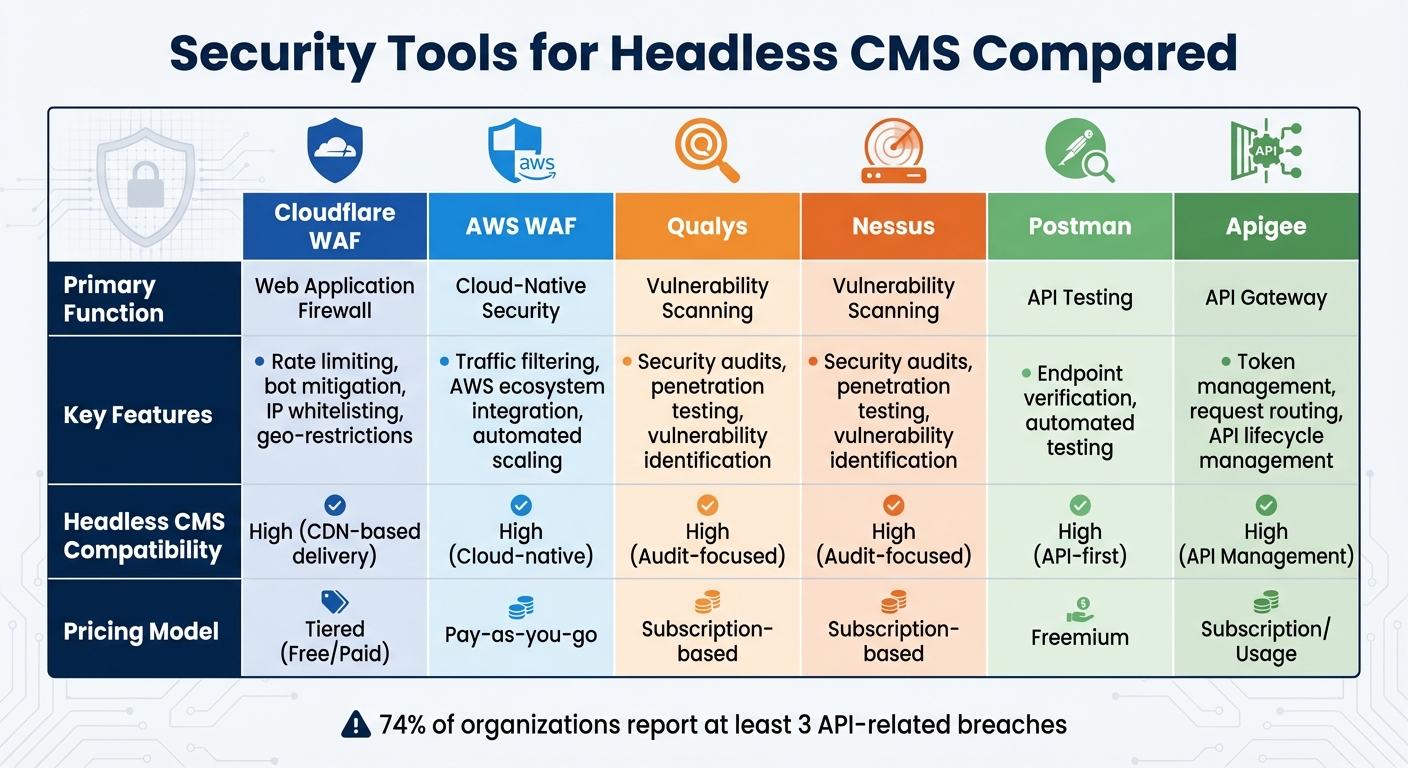
Headless CMS Security Tools Comparison: Features, Functions, and Pricing
Strengthening your headless CMS setup involves more than just following best practices - it’s about choosing the right security tools to protect your APIs, detect threats in real-time, and scan for vulnerabilities. The key players in this space include Web Application Firewalls (WAFs), API gateways, vulnerability scanners, and testing platforms. Each tool serves a specific purpose, and understanding their roles can help you create a multi-layered defense strategy capable of addressing a variety of attack vectors.
With 74% of organizations reporting at least three API-related breaches and 40% facing five or more, the need for a solid security stack is undeniable. Cybercrime is costly, and investing in a robust toolkit can significantly reduce your risks.
When choosing tools, focus on API-first compatibility. Features like OAuth 2.0 support, JWT handling, and token management are critical for headless CMS architectures. Additionally, tools that integrate seamlessly with cloud-native environments, provide automated updates, and offer built-in encryption are essential. This ensures protection across both frontend and backend systems, minimizing the chance of cascading failures.
Security Tool Comparison Table
| Tool | Primary Function | Key Features | Headless CMS Compatibility | Pricing Model |
|---|---|---|---|---|
| Cloudflare WAF | Web Application Firewall | Rate limiting, bot mitigation, IP whitelisting, geo-restrictions | High (CDN-based delivery) | Tiered (Free/Paid) |
| AWS WAF | Cloud-Native Security | Traffic filtering, AWS ecosystem integration, automated scaling | High (Cloud-native) | Pay-as-you-go |
| Qualys | Vulnerability Scanning | Security audits, penetration testing, vulnerability identification | High (Audit-focused) | Subscription-based |
| Nessus | Vulnerability Scanning | Security audits, penetration testing, vulnerability identification | High (Audit-focused) | Subscription-based |
| Postman | API Testing | Endpoint verification, automated testing | High (API-first) | Freemium |
| Apigee | API Gateway | Token management, request routing, API lifecycle management | High (API Management) | Subscription/Usage |
Cloudflare and AWS WAFs are excellent for filtering HTTP traffic and blocking malicious injections in real time. They also offer features like rate limiting and geo-restrictions, giving you control over who can access your content and from where. Vulnerability scanners like Qualys and Nessus are indispensable for identifying weaknesses in API endpoints and configurations. On the other hand, API gateways such as Apigee manage token-based authentication and request routing, acting as a secure bridge between your backend services and clients. Lastly, Postman’s freemium model makes it a go-to tool for endpoint verification and automated testing.
Conclusion and Key Takeaways
Summary of Best Practices
Securing a headless CMS calls for a well-rounded strategy that covers authentication, data protection, API security, and ongoing monitoring. Start by implementing Multi-Factor Authentication (MFA) and Role-Based Access Control (RBAC) to limit access to sensitive content. Protect your data by encrypting it - use AES-256 for data at rest and SSL/TLS for data in transit. For APIs, rely on token-based authentication methods like OAuth or JWT, enforce rate limits, and verify webhook signatures with cryptographic methods. Additionally, keep detailed activity logs and regularly conduct security audits to uncover and address vulnerabilities before they can be exploited.
While the decoupled nature of a headless CMS reduces the attack surface compared to traditional platforms, securing API endpoints and managing access controls are still critical. Together, these practices create a strong security foundation that safeguards your operations and protects your data.
Final Thoughts on Headless CMS Security
Focusing on security for your headless CMS does more than just reduce risks - it also supports better business outcomes. Strong security measures can lead to faster publishing workflows, smoother content delivery, and improved regulatory compliance. Beyond avoiding costly downtime, robust security fosters trust and ensures adherence to standards like GDPR. Companies that have recently transitioned to headless CMS platforms have shown how effective security practices can boost operational efficiency.
To strengthen your defenses further, rotate API keys frequently, sanitize user inputs to prevent SQL injection, and automate daily backups to secure offsite locations. Add layers of protection with tools like Web Application Firewalls (WAFs) and vulnerability scanners. For cloud-hosted CMS solutions, remember that while the provider secures the infrastructure, you are responsible for properly configuring access controls and API settings.
Looking for more tips on secure website building tools? Visit Top Website Builders for a comprehensive directory of platforms offering built-in security features tailored to your needs.
FAQs
What’s the fastest way to secure a headless CMS API?
To secure a headless CMS API effectively, start with strong authentication methods like OAuth or JWT. These ensure only authorized users can access the API. Additionally, enforce access controls to limit permissions based on user roles, and implement rate limiting to block excessive requests that could signal misuse or attacks. Lastly, make regular security audits a priority to uncover vulnerabilities and maintain robust protection over time.
How often should I rotate API keys, tokens, and webhook secrets?
Keeping your system secure means staying proactive about potential vulnerabilities. One effective step is to rotate API keys, tokens, and webhook secrets on a regular basis. Experts suggest doing this every 30 to 90 days. This practice minimizes the risk of unauthorized access and strengthens your system’s overall security.
What should I log and alert on for a headless CMS?
To keep a headless CMS secure, it's essential to track key activities. This includes logging login attempts (both successful and failed), user authentications, and content changes - noting details like who made the change, what was altered, and when it occurred.
Set up alerts for anything out of the ordinary, such as repeated failed login attempts, unusual access patterns, unauthorized content edits, or sudden spikes in API usage. These measures not only help spot potential threats but also protect content integrity and support adherence to security standards.