Choosing between Squarespace and Wix comes down to what matters most to you: variety or design precision.
- Wix offers over 2,000 templates covering nearly every industry, with a drag-and-drop editor for maximum design control. However, mobile adjustments often require extra effort, and switching templates later means starting from scratch.
- Squarespace provides around 190 templates, focusing on polished, structured designs ideal for top portfolio sites for creatives and visually focused industries. Its grid-based editor ensures automatic mobile responsiveness and allows template changes without losing content.
Quick Comparison
| Feature | Wix | Squarespace |
|---|---|---|
| Template Count | 2,000+ | 190 |
| Design Approach | Freeform, customizable | Structured, polished |
| Mobile Editing | Manual adjustments | Automatic responsiveness |
| Template Switching | Requires rebuild | Easy, no content loss |
| Best For | Broad industries | Visual professionals |
Wix is great if you want flexibility and variety. Squarespace is better for sleek, ready-to-use designs.
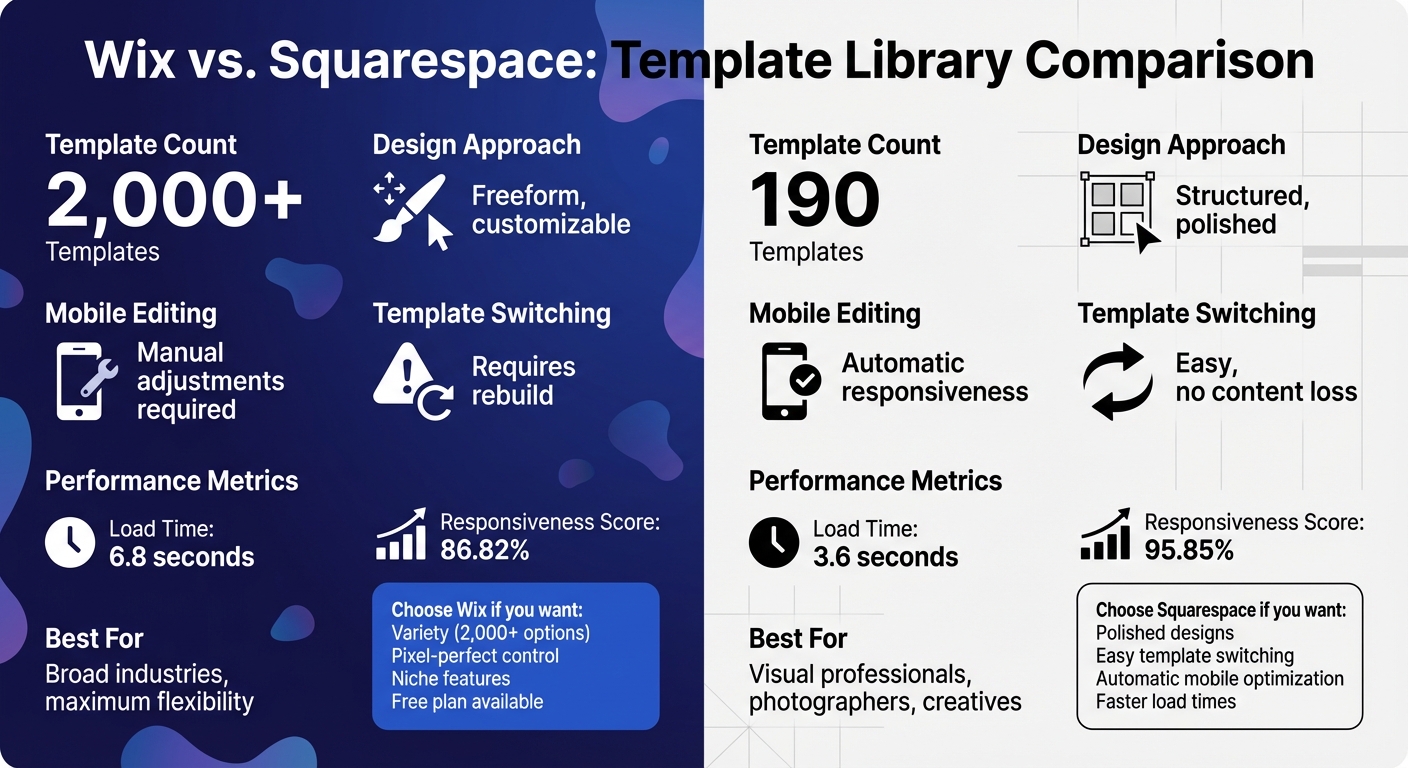
Wix vs Squarespace Template Library Comparison Chart
Wix Template Library
Template Count and Range
Wix offers more than 2,000 free, professionally designed HTML5 templates, giving users a massive variety to choose from. These templates cater to virtually every industry imaginable - whether you're setting up an online store, a photography portfolio, a real estate site, or even a personal wedding page or CV.
This extensive library ensures options for almost any purpose, from creative portfolios and personal blogs to highly specific business needs.
Customization and Mobile Features
Wix’s editor uses a true drag-and-drop system, letting you move elements anywhere on the page without being restricted by a grid. Plus, the Site Design panel simplifies the process of updating global design elements like fonts and colors.
Wix also stands out with its dedicated mobile editor. This tool allows you to make mobile-specific adjustments, such as hiding desktop elements, resizing sections, or adding buttons that only appear on mobile. With 64.35% of web traffic coming from mobile devices, this feature is a game-changer.
For those looking to get started quickly, Wix’s AI website builder (previously known as ADI) can create a complete site - including layout, theme, and images - in roughly 60 seconds using a conversational interface. For professionals and agencies, Wix Studio offers advanced tools like CSS customization and the ability to design reusable templates for client projects.
Up next, we’ll see how Squarespace’s tools compare to Wix’s impressive editing capabilities.
sbb-itb-94eacf4
Squarespace Template Library
Template Count and Design Style
Squarespace provides a carefully curated selection of 193 templates (as of March 2026) that stand out for their sleek typography, ample use of whitespace, and thoughtfully designed layouts. While the number of templates may seem limited, the emphasis is on quality rather than sheer volume.
As Inka Wibowo, Content Manager at Tooltester, explains: "Squarespace has long been the gold standard when it comes to sleek, polished template designs for your professional website".
This approach ensures that every template is modern, cohesive, and free from outdated elements. The templates cater to industries where visual appeal is key - such as photography, fashion, blogging, restaurants, and creative portfolios and other top website builders. However, to make the most out of these designs, professional-quality images are essential. Compared to Wix's extensive library, Squarespace’s smaller collection highlights its commitment to maintaining a consistent and polished aesthetic.
This design philosophy also carries over seamlessly to mobile performance.
Mobile Design and Grid-Based Editing
All Squarespace templates are automatically responsive, meaning they adapt to mobile devices and tablets without requiring extra adjustments. This contrasts with Wix, where achieving optimal mobile views often involves manual fine-tuning.
Squarespace's editing system, known as Fluid Engine, relies on a grid-based layout. Elements snap into rows and columns as they’re moved, offering creative flexibility while maintaining a structured design. Steve Benjamins, founder of Site Builder Report, captures the difference well:
"Squarespace is curated and design-y while Wix is occasionally chaotic but allows for a lot of freedom to customize".
This grid-based system isn’t just about aesthetics - it also contributes to better performance. Squarespace sites load their main content in an average of 3.6 seconds, and 95.85% of them score well for responsiveness during user interactions. In comparison, Wix sites average 6.8 seconds for loading and achieve an 86.82% responsiveness score.
Side-by-Side Comparison
Comparison Table
To get a clearer picture of the strengths and approaches of these top website building tools, let’s break things down side by side.
Wix leans heavily into variety, offering over 2,000 templates that cater to a broad range of industries. On the other hand, Squarespace takes a more curated approach, with 160–200+ templates that prioritize a polished, designer-focused aesthetic. As Ryan Kane puts it, the difference boils down to "minimalism versus maximalism". Squarespace templates emphasize clean typography and generous whitespace, while Wix spans a broader spectrum, ranging from sleek and modern to occasionally outdated designs.
This difference also shows up in how the platforms handle mobile responsiveness. Squarespace templates automatically adapt to any screen size using a structured grid system. Wix, however, requires manual adjustments to ensure templates look good on mobile devices.
| Criteria | Wix | Squarespace |
|---|---|---|
| Template Count | 2,000+ | 160–200+ |
| Niche Variety | Broad range; covers nearly every industry | Curated; tailored for creative and professional use |
| Design Quality | Diverse, with some inconsistencies in older templates | Consistently sleek, elegant, and professional |
| Mobile Responsiveness | Mobile-friendly but needs manual adjustments | Fully responsive with automatic adaptation |
| AI Integration | Conversational AI for quick site generation, image creation, and marketing tools | Blueprint AI for guided setup with a focus on text and SEO |
AI tools also play a big role in distinguishing the two. Wix features a conversational chatbot capable of generating an entire site in about 60 seconds. It also includes an AI image generator and marketing tools. Squarespace, meanwhile, uses Blueprint AI to guide users through a structured setup, emphasizing text generation and SEO optimization.
These differences highlight the platforms' unique approaches: Wix offers flexibility and variety, while Squarespace focuses on refinement and ease of use.
Customization and Editing Tools
Editing Systems
Wix and Squarespace take very different approaches when it comes to their editing tools. Wix offers a freeform drag-and-drop editor, allowing you to place elements anywhere on the page, right down to the pixel. This gives you complete creative flexibility, but it also means you’ll need to make separate adjustments for mobile layouts to avoid any overlapping issues.
Squarespace, on the other hand, uses its Fluid Engine, a grid-based system where elements snap neatly into rows and columns. This structured approach makes it easier to maintain a clean design and is generally more user-friendly for those without a design background, making it one of the top professional website builders for ease of use. The grid also adapts content for mobile screens automatically, though you might still need to make occasional tweaks.
Steve Benjamins, founder of Site Builder Report, captures the challenge of Wix’s open-ended design:
"Giving someone Wix is like giving someone a blank canvas with all the colors, the paintbrushes... that much open-endedness is a lot of responsibility to hand off to a user not quite adept at web designing".
In line with this, Wix’s interface is packed with icons and menus, which can feel overwhelming. Squarespace, by contrast, keeps things simple with a minimalist design, plenty of white space, and a full-screen editing mode.
These contrasting editing styles also influence how each platform handles template changes and advanced coding options.
Template Switching and Code Access
When it comes to templates, Wix locks you into your initial choice. If you want to switch to a new design, you’ll need to rebuild your site from scratch. Squarespace, however, offers more flexibility. With version 7.1, you can redesign your site’s appearance without losing any content, as all templates share the same foundational structure.
Both platforms allow custom CSS and JavaScript, but there are some limitations. Squarespace typically requires a Business/Core plan (starting at $23/month) or higher to unlock these features. Wix provides advanced CSS control through Wix Studio, which is tailored for agencies and developers. Additionally, Wix makes it easier to use third-party fonts directly within its editor, while Squarespace often relies on custom CSS to achieve the same result.
WIX vs SQUARESPACE - Which is Best? (2026)
Key Takeaways
Looking at the comparisons of top website building platforms regarding template options, design quality, and customization tools, here’s what stands out:
The decision between Squarespace and Wix often boils down to quantity versus quality. Wix offers a staggering 2,000+ templates, catering to a wide range of industries and styles. On the other hand, Squarespace provides a smaller selection of around 160 to 190 templates, focusing on polished, professional designs with clean layouts and plenty of whitespace.
Go with Squarespace if you’re after sleek, ready-to-go designs. It’s a great choice for photographers, artists, and bloggers who value visually stunning, full-bleed portfolio layouts. Squarespace 7.1 also makes it easy to switch templates without losing content, and its grid-based system ensures your site looks great on mobile devices automatically.
Choose Wix if creative control is your priority. Its drag-and-drop editor offers pixel-perfect customization, making it ideal for users who need unique designs or specialized features like hotel bookings or forums. With over 500 apps in its marketplace, Wix supports a wide range of niche functionalities. Plus, Wix is often cited among the best free website builder software because it offers a free plan (ad-supported), unlike Squarespace, which limits you to a 14-day trial.
One caveat: Wix locks your site to the template you initially choose. If you want to make major design changes later, you’ll have to rebuild your site from scratch.
FAQs
Which platform is easier for non-designers to build a good-looking site?
Squarespace is a great choice for those who aren’t designers but want a professional-looking website. Its templates are polished and ready to go, requiring very little tweaking to create an appealing site in no time. The platform’s curated options make it perfect for anyone looking for a quick and straightforward setup.
On the other hand, Wix offers more creative freedom with its drag-and-drop editor. While this flexibility is a plus, it can be a bit much for beginners who might feel overwhelmed by all the options. For those who prefer simplicity and want a sleek, professional site without too much effort, Squarespace might be the better fit.
Can I change my site’s template later without rebuilding everything?
Yes, both Wix and Squarespace let you update your site’s template without rebuilding everything from scratch. Wix uses a drag-and-drop editor, making it easier to adjust elements when switching templates. Squarespace also allows template changes, but its more structured editor might need a bit of tweaking to ensure your content fits the new layout. Both platforms are designed to give you the flexibility to refresh your site’s appearance after it’s live.
How much work does it take to make the site look great on mobile?
Making a website shine on mobile devices depends on the platform you choose and your design objectives. Wix offers a variety of customizable templates specifically designed for mobile use, but you might need to tweak layouts to get everything just right. On the other hand, Squarespace provides sleek, pre-designed templates that are typically mobile-friendly from the start, requiring less adjustment.
In short, Wix gives you more room for customization, while Squarespace makes it easier with templates that are optimized for mobile straight out of the gate.


