Creating a professional online portfolio has never been easier in 2026. no-code tools for website creation like Framer offer pre-designed templates that require zero coding skills, making it simple for anyone - freelancers, designers, photographers, or developers - to showcase their work online. These templates are packed with features like SEO tools, mobile optimization, and customizable layouts, saving you time and effort while delivering polished results.
Here are the 10 best no-code portfolio templates of 2026:
- Hanssen: Clean, modern design with light/dark mode and CMS integration. Ideal for photographers and designers.
- Norden: Scandinavian-inspired design with ample whitespace and responsive layouts. Perfect for minimalists.
- Arik: Bold, black-and-white aesthetic with smooth animations. Great for freelancers and agencies.
- Porto: Dark, professional style with dedicated photography pages. Best for photographers and visual artists.
- Villo: Dynamic layout with interactive skill bars and light/dark mode toggle. Suited for UX/UI professionals.
- Praxis: Sleek, structured design with dual CMS collections for projects and blogs. Ideal for content-rich portfolios.
- Portal: Minimalist, tech-focused template with skills tags and FAQ sections. Perfect for developers and tech professionals.
- Jake Roberts: High-contrast, single-page layout with Swiss grid design. Great for personal branding.
- Nitro: Dark theme with floating cards and bold typography. Best for designers and marketers.
- Akio: Vibrant, colorful design with interactive elements. Excellent for fashion and artistic portfolios.
These Framer templates are free, easy to customize, and designed for various industries. Whether you’re a freelancer or a creative professional, these tools let you build a polished portfolio in hours, not weeks.
Quick Comparison
| Template | Design Style | Key Features | Best For | Free |
|---|---|---|---|---|
| Hanssen | Modern, simple | Light/dark mode, CMS integration | Photographers, designers | Yes |
| Norden | Minimal, Nordic | Ample whitespace, responsive | Minimalist creatives | Yes |
| Arik | Bold, black/white | Animations, multi-page setup | Freelancers, agencies | Yes |
| Porto | Dark, professional | Photography-focused pages | Photographers, artists | Yes |
| Villo | Dynamic, interactive | Skill bars, light/dark toggle | UX/UI professionals | Yes |
| Praxis | Sleek, structured | Dual CMS for blogs/projects | Content-rich portfolios | Yes |
| Portal | Minimal, tech-focused | FAQ, skills tags, client logos | Developers, tech pros | Yes |
| Jake Roberts | Bold, Swiss grid | High-contrast single page | Personal branding | Yes |
| Nitro | Dark, energetic | Floating cards, bold typography | Designers, marketers | Yes |
| Akio | Vibrant, colorful | Interactive elements, CMS | Fashion, artistic portfolios | Yes |
These templates combine functionality with aesthetic appeal, helping you create a professional online presence effortlessly.
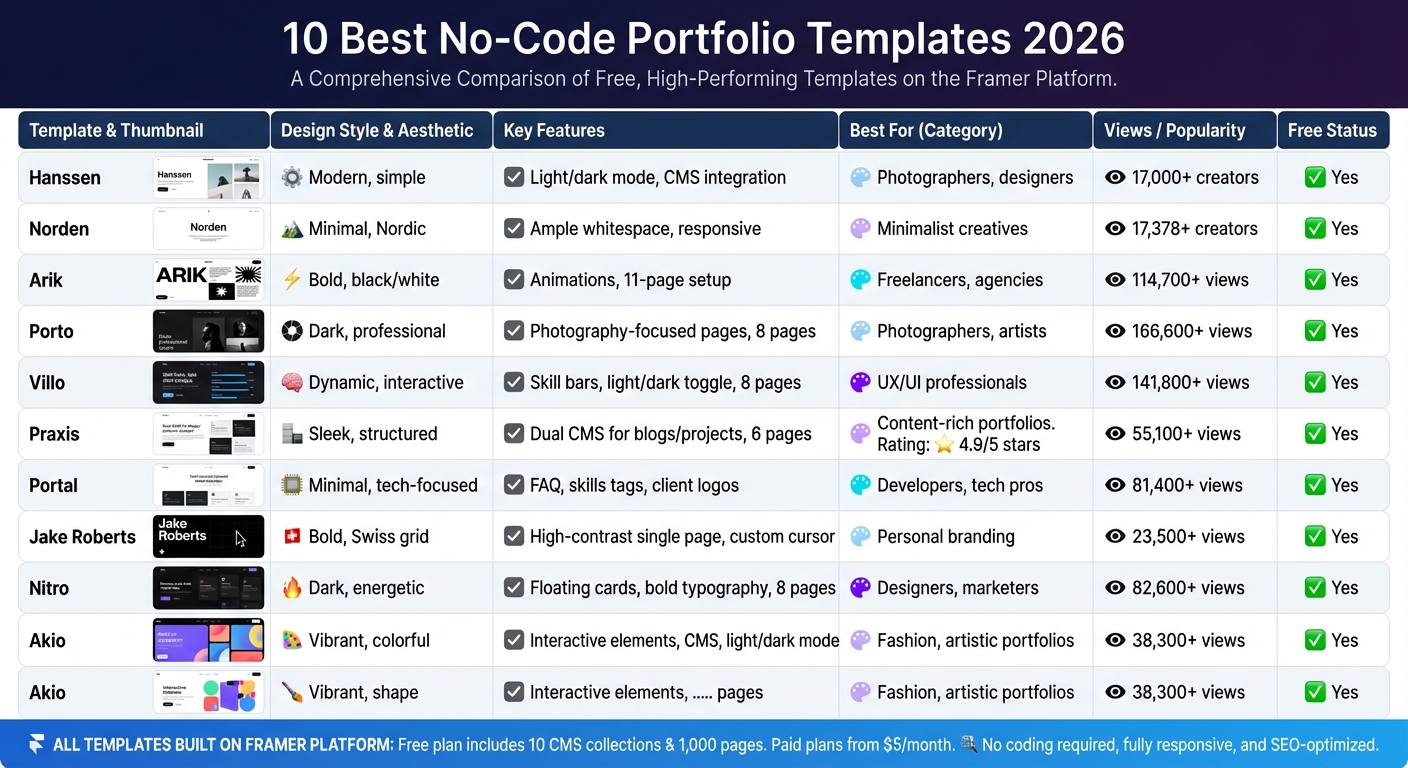
10 Best No-Code Portfolio Templates 2026 Comparison Chart
1. Hanssen Framer Template
Design Style
Hanssen is all about simplicity and elegance, designed to put your work front and center. Created by Pawel Gola, this template uses a soft beige color scheme to highlight authentic moments and striking visuals. One standout feature is its dual-mode support, allowing you to switch effortlessly between light and dark themes. With over 17,000 creators trusting this design, its pixel-perfect layout ensures your portfolio looks polished and professional.
Key Features
Hanssen comes with eight essential pages: Home, About, Contact, Work, Work Single, Blog, Blog Single, and a 404 error page. Its built-in CMS simplifies updates - you can manage projects and posts without touching the layout. The template is built with clean, SEO-friendly HTML, complete with proper tags and automated metadata. Plus, performance optimizations ensure your site loads quickly whether viewed on mobile, tablet, or desktop.
"Hanssen is a minimal free Framer portfolio template... designed to showcase work in a clean black and white aesthetic while keeping the focus on your projects and writing." - Pawel Gola, Template Creator
Ideal Use Cases
Hanssen is perfect for photographers, graphic designers, developers, and freelancers seeking a sleek, content-focused portfolio. It’s especially well-suited for editorial and commercial photography, whether you’re showcasing portraits, landscapes, or high-end visuals. If you want a professional-grade portfolio without spending a dime, Hanssen delivers exceptional quality at no cost.
Customization Ease
True to its minimalist approach, Hanssen’s modular UI components make customization a breeze - no coding required. You can rearrange sections, tweak spacing, and modify layouts using Framer's visual editor. Editable Figma files help you plan design changes in advance, while the integrated CMS ensures consistent formatting across your galleries. Thanks to its mobile-first, responsive design, your site will look polished on any device.
sbb-itb-94eacf4
2. Norden Framer Template
Design Style
Norden draws its inspiration from Scandinavian design, offering a portfolio experience that's both calming and intentional. With a narrow, clean layout, plenty of whitespace, and a neutral color palette, this template keeps the focus firmly on your creative work. Its Nordic-inspired simplicity is paired with functionality, making it an ideal choice for showcasing your projects. Plus, Norden provides both light and dark display modes, allowing you to tailor the aesthetic to your brand's personality. This thoughtful design pairs perfectly with the template's technical features.
Key Features
Norden combines a minimalist look with advanced web building tools. Its fully responsive design ensures your portfolio looks great on any device. The integrated CMS via Framer makes managing projects and updating content a breeze - no coding required. This ease of use is a hallmark of the top professional website builders currently on the market. Fast loading speeds and an SEO-friendly structure, complete with clean HTML and proper metadata, help your work get noticed.
"Norden embodies the essence of Nordic design with its clean lines, open spaces, and a neutral color scheme." - Gola Supply
Ideal Use Cases
Norden stands out by combining a refined Nordic aesthetic with practical features. It's a perfect fit for creative professionals like photographers, web designers, and digital artists who prefer a minimalist approach. The narrow layout and generous white space create a gallery-like experience, allowing each project to shine individually. If you want a portfolio that prioritizes readability and keeps the focus on your craft rather than decorative distractions, Norden is an excellent choice.
Customization Ease
Norden isn't just visually appealing; it's also incredibly easy to customize. With a modular UI and an intuitive visual interface, you can tweak layouts, adjust spacing, and update visuals without needing any coding skills. For those who like to plan their designs, customizable Figma files are included. Trusted by over 17,378 creators, Norden's structure has been praised as "immaculately designed" and "pixel perfect" by reviewers.
3. Arik Framer Template
Design Style
Arik embraces a bold, minimalist look with its black-and-white color palette and oversized typography. Designed by Pawel Gola, this template has drawn over 114,700 views on the Framer Marketplace. It offers an 11-page structure, including sections like Home, Services, About, and Pricing - going beyond the typical template offerings. Subtle animations add a touch of sophistication, complementing its clean and polished appearance.
Key Features
Arik balances functionality with user accessibility. It comes equipped with SEO-friendly website builder features, such as editable meta tags, optimized headings, and clean URL structures, designed to improve search engine rankings. Plus, its integration with Framer CMS allows you to manage project collections and dynamically update content. The design ensures a seamless experience across devices, whether you're on a desktop, tablet, or smartphone.
Ideal Use Cases
This template is an excellent choice for freelancers, designers, and agencies aiming to establish a professional online presence without the expense of premium options. Its dark aesthetic and bold typography cater to creative professionals who want a modern and commanding portfolio. Whether you’re showcasing photography, design projects, or digital artwork, Arik’s strong visual hierarchy ensures your work stands out. The multi-page setup is also ideal for service providers needing space for pricing details and comprehensive service descriptions.
Customization Ease
Framer’s drag-and-drop visual editor makes customization straightforward - no coding required. You can tweak fonts, colors, and layout elements directly on the canvas, seeing updates in real time. The modular grid system simplifies content organization and rearrangement without sacrificing flexibility. For advanced design control, editable Figma files are included, allowing you to refine elements before bringing them into Framer. Despite being free, Arik delivers the level of customization you'd expect from a premium template.
4. Porto Framer Template
Design Style
Porto takes a bold yet polished approach, offering a darker, minimalist design that keeps the spotlight on your creative work. Designed by Westhill Studio, this template has drawn over 166,600 views on the Framer Marketplace. Its black-and-white typographic style eliminates distractions, creating a sleek and professional backdrop for showcasing your portfolio. The design prioritizes a "work-first" philosophy, ensuring your projects are the main attraction without competing with the template itself.
Key Features
Porto comes with eight well-structured pages, including Home, Work, Work Single, and a dedicated Photography page, giving you a strong framework for presenting your work. Subtle animations add a polished touch without being overpowering, while its project-focused layouts immediately capture attention. Despite its premium aesthetic, Porto is available for free on the Framer Marketplace. These features make it an excellent choice for creative professionals looking to make a strong impression.
Ideal Use Cases
This template is perfect for creative designers, digital agencies, and freelancers who want a portfolio-first design. Photographers, in particular, will appreciate the dedicated Photography page and the high-contrast dark theme, which enhances visual projects. The combination of detailed case study pages and broader project overviews creates a clear structure that effectively guides visitors through your portfolio.
Customization Ease
Porto is designed with ease of use in mind, making it accessible even for those without technical skills. Framer's drag-and-drop visual editor allows you to tweak typography, colors, and layouts to align with your brand identity, all without writing a single line of code. The built-in Content Management System also simplifies project updates, making it easy to keep your portfolio fresh. Whether you're starting from scratch or updating an existing portfolio, Porto's tools let you maintain its sleek and sophisticated style effortlessly.
5. Villo Framer Template
Design Style
Villo brings a sleek, minimalist design with a bold edge. Designed by CocoBasic, this template has garnered over 141,800 views on the Framer Marketplace. Its standout feature is the large blue typography paired with ample white space, creating a clear visual hierarchy that naturally guides visitors through the content. Unlike simpler single-page templates, Villo offers a robust eight-page structure, covering Home, About, Projects, Experience, Skills, Education, Writing, and Contact. It also includes a dark and light mode toggle, allowing users to switch viewing modes effortlessly - a feature not commonly found in free templates.
Key Features
Villo is packed with features that enhance both functionality and aesthetics. It includes two CMS collections tailored for managing the Projects and Writing sections, making it easy to update content without reworking the layout. Interactive skill bars, such as Framer 92%, visually showcase proficiency. Smooth animations, sticky scrolling, and parallax effects add a polished feel, keeping the design engaging yet easy to navigate. Widya Bayu W, Co-founder of Velox Themes, highlighted:
"What has been a huge unique selling point for me is the light and dark mode toggle"
The template is also optimized for speed and comes with built-in SEO tools to help improve visibility. Like other top-tier templates, Villo is one of the easiest ways to build a website because it simplifies content management and eliminates the need for coding.
Ideal Use Cases
Villo's versatility makes it a great choice for a range of professionals. It's especially suited for UX/UI designers who need to present detailed case studies and web developers showcasing technical portfolios. The Writing section is perfect for creative professionals aiming to share blog posts or articles to establish expertise in their field. Freelancers offering professional services will benefit from its all-in-one design, functioning as both a portfolio and digital resume. The interactive skill bars and Experience section are particularly effective for highlighting technical skills alongside creative projects.
Customization Ease
Built on Framer's visual editor, Villo allows you to tweak layouts, colors, and fonts without touching a single line of code. Its CMS functionality for Projects and Writing ensures you can keep your portfolio up-to-date without redesigning components. Features like sticky scrolling and parallax effects are ideal for emphasizing key visuals in UX/UI case studies. Despite its premium-level features and multi-page setup, Villo is free on the Framer Marketplace, with an optional $499 customization service available for those seeking a professional setup.
6. Praxis Framer Template
Design Style
Praxis is designed to present your work with a sleek and functional layout. Created by Anatolii Dmitrienko, it has garnered over 55.1K views on the Framer Marketplace and boasts an impressive 4.9/5 star rating from more than 5,833 creators. A key feature is its bottom-positioned navigation panel on desktop, which maximizes the space available for content. The template also includes smooth page transitions and stagger animations for CMS items, giving it a dynamic yet polished feel. Its minimal design ensures a professional look without unnecessary clutter.
Key Features
Praxis includes two built-in CMS collections for Projects and Articles, making it perfect for showcasing both portfolio pieces and blog content. It comes with six pre-designed pages: Home, Project (CMS), Article (CMS), Projects, Blog, and 404. Additionally, it features sections for services, testimonials, and project showcases, helping establish a strong professional presence. The template is fully responsive, ensuring your portfolio looks great on desktops, tablets, and smartphones. UI designer Muhammad Suleman shared his thoughts on the template:
"Anatoli is very creative designer. I used his templates and these templates are best templates I have ever used. The design is beautiful and super easy to customize".
Ideal Use Cases
This template is an excellent choice for freelancers, small business owners, and creative professionals who need a content-rich website. Thanks to its dual CMS setup, it’s ideal for combining a portfolio with a blog or knowledge base, allowing users to showcase their skills and expertise effectively.
Customization Ease
Praxis stands out for its ease of customization. With Framer's drag-and-drop interface, no coding skills are required. You can tweak colors, fonts, and layouts directly in the visual editor, making it possible for most users to launch their sites within 1–2 days. The template is free to download from both Templifica and the Framer Marketplace, though publishing on a custom domain and accessing full CMS features requires a Framer subscription, starting at around $15/month. The creator also provides email support and free lifetime updates, ensuring help is always available when needed.
7. Portal Framer Template
Design Style
Portal takes the minimalist trend and gives it a polished, professional edge. Designed by Framebase, this no-code portfolio template is all about letting your work shine without unnecessary distractions. With over 81,400 views on the Framer Marketplace and an update as recent as late 2025, it’s clear this design has struck a chord. Its clean lines and light color palette create a sleek, modern look. As Framebase explains:
"The minimalist design keeps the spotlight on your agency's or portfolio's aesthetics, ensuring your work shines through effortlessly".
Portal doesn’t just look good - it’s functional too. It includes a project showcase, a testimonials section, and a four-step workflow process that walks visitors through Discovery, Design, Development, and Handover. This layout is both visually appealing and easy to navigate.
Key Features
Portal comes packed with features designed to make your portfolio stand out. These include:
- Three main pages: Home, Projects, and 404.
- A hero section, project grid, skills tags, and an experience timeline.
- An FAQ accordion for answering common questions.
- "Available for work" status indicators and multiple "Get In Touch" call-to-action buttons.
- A "Trusted by" logo cloud to showcase client brands and build trust.
The skills and expertise tags are particularly useful, allowing recruiters to quickly identify your proficiencies - whether it’s UX, UI, or Webflow.
Ideal Use Cases
Portal is perfect for creative professionals who want to present their work in a premium, high-end way. Whether you’re a freelancer, a digital agency, or a designer specializing in UI/UX or product design, this template has you covered. The built-in testimonials and client logo sections are especially handy for attracting new clients and showcasing your credibility.
Customization Ease
This template is free on the Framer Marketplace, and it’s as user-friendly as it gets. With seamless Figma integration, you can import visuals directly into your site, ensuring brand consistency. Framer’s on-page editing feature also lets you tweak content directly in your browser - no coding required.
Since the design leans heavily on high-quality visuals and well-structured case studies, it’s a good idea to double-check how your updates look on mobile devices. Many recruiters review portfolios across multiple screen sizes, so keeping things responsive is key.
8. Jake Roberts Framer Template
Design Style
Designed by Paul Lapkin, the Jake Roberts template is all about making a bold statement. It combines oversized typography, a sleek black background, and Swiss grid layouts to create a minimalist yet striking aesthetic. With over 23,500 views on the Framer Marketplace, this free portfolio template is perfect for creators who want their work to grab attention instantly. As Paul Lapkin describes it:
"Built for impact. Jake Roberts® is a FREE personal portfolio template for Framer, featuring bold type, Swiss grids, and high contrast - perfect for creators who want to stand out unapologetically."
The dark, high-contrast theme amplifies the visual appeal of your portfolio, making it an excellent choice for showcasing standout projects. This design style is perfect for those who want their work to speak loudly and clearly.
Key Features
This template offers a clean and efficient single-page layout, complete with built-in home and 404 error pages. It includes an integrated CMS, making project updates seamless. Additional interactive elements like custom cursors and smooth scrolling give the template a polished and professional feel.
Ideal Use Cases
Jake Roberts is a great fit for creative professionals in industries like fashion, music, sports, and entertainment. Whether you're a freelancer or an entrepreneur looking to build a personal brand using essential building tools, this template helps you present your work with a strong visual narrative.
Customization Ease
Customizing this template is simple. Framer's Assets tab allows you to adjust colors and typography across the site with ease. While the customization options are not as detailed as some advanced templates, they are user-friendly and effective. You can also preview your changes across multiple devices to ensure your portfolio looks great everywhere. Jake Roberts stands out as one of 2026's must-try free no-code portfolio templates for its bold design and ease of use.
9. Nitro Framer Template
Design Style
Nitro offers a sleek, dark-themed design aimed at professionals who want their portfolios to stand out. It combines visual appeal with functionality, making it a strong choice for modern no-code portfolios. The template uses bold typography paired with a clean grid layout, while floating cards add a sense of depth without pulling attention away from your content. It’s no surprise it has garnered 82.6K views on the Framer Marketplace.
As Easyfast puts it:
"Nitro is a neatly crafted and CMS-based portfolio template with floating cards effect and advanced grid layout ready to showcase your work in the best way possible."
Key Features
Nitro includes eight essential pages: Home, Projects, About, Blog, and four utility pages. Built on a CMS system, it allows you to manage and update your projects and blog posts dynamically, saving you from manual edits. Updated in February 2026 to incorporate the latest Framer features, Nitro also boasts smooth animated transitions, creating an interactive experience that emphasizes your work. These features make it a standout for visually compelling portfolios.
Ideal Use Cases
This template is perfect for graphic designers, web designers, and visual designers who want to highlight striking visuals alongside bold headlines. Whether you’re showcasing brand identity work or preparing an agency presentation, Nitro’s CMS system makes it easy to scale your portfolio as your project library grows.
Customization Ease
Nitro’s dynamic layout is not only visually engaging but also incredibly easy to customize. Framer’s visual interface lets you tweak layouts, colors, and typography effortlessly. Adding new data automatically updates the grid, streamlining your workflow. Plus, its fully responsive design ensures your portfolio looks professional on any device - desktop, tablet, or smartphone. Best of all, it’s free on the Framer Marketplace, making it one of the best free portfolio website builders. This combination of flexibility and design impact makes Nitro an excellent tool for creating polished, high-quality portfolios.
10. Akio Framer Template
Design Style
Akio offers a bold and lively approach to portfolio design. Created by Joao Alano, it’s described as a "creative playground". Unlike templates that lean toward simplicity, Akio stands out with its vibrant colors and stylish elements, all while maintaining a clean, grid-based structure. It’s a popular choice, with over 38,300 views on the Framer Marketplace. The template also includes interactive objects, giving users more creative flexibility alongside its visually striking design.
Key Features
Akio includes four pre-designed pages: Home, Works, Previous Projects, and a custom 404 page. These pages are built on a structured grid system that keeps everything organized. The template incorporates custom code components, micro-interactions, smooth scrolling, and real-time interactions to boost user engagement. It also features a light/dark mode switch and an optimized CMS for easy updates. Best of all, it’s completely free on the Framer Marketplace.
Ideal Use Cases
This template is a great fit for fashion portfolios, personal brands, and creative professionals who want a standout online presence. Its vibrant aesthetic and dedicated "Previous Projects" page make it perfect for showcasing visually impactful work while maintaining a well-organized archive of past projects.
Customization Ease
Akio is designed with beginners in mind. The integrated grid system makes layout management straightforward, and its component-based structure allows users to easily rearrange sections to suit their brand. Using Framer’s visual interface, you can tweak colors, typography, and interactive elements without needing to code. Plus, its fully responsive design ensures your portfolio looks polished on desktops, tablets, and smartphones.
Build a Modern Portfolio Website in Framer | No-Code Framer tutorial
Template Comparison Table
Here’s a quick breakdown of each template’s design style, key features, ideal use cases, and how customizable they are.
All ten templates in this guide are built on Framer, a platform that strikes a balance between beginner-friendly tools like Wix and more advanced options like Webflow. Framer offers a moderate learning curve but packs powerful customization capabilities. Its visual design interface and Figma import feature make it a go-to for designers who want to bring their creations straight from Figma to a live website.
When comparing these templates, the standout factors include design style, features, and target audience. For example, Akio emphasizes bold, vibrant designs with interactive elements, while others like Norden focus on minimalism and clean typography. Thanks to Framer’s component-based structure, all templates are relatively easy to customize, though templates with complex animations or custom code may require a bit more experience with the platform.
Here’s a side-by-side look at the templates:
| Template | Design Style | Main Features | Best Use Cases | Customization Level |
|---|---|---|---|---|
| Hanssen | Modern, professional | Multi-page structure, CMS integration | UX/UI designers, digital agencies | High |
| Norden | Minimalist, Scandinavian | Clean layouts, typography focus | Graphic designers, creative pros | High |
| Arik | Contemporary, sleek | Smooth animations, grid-based | Web designers, developers | High |
| Porto | Classic, elegant | Portfolio galleries, case study pages | Photographers, visual artists | High |
| Villo | Bold, dynamic | Interactive elements, micro-interactions | Creative agencies, brand designers | High |
| Praxis | Professional, structured | Project management layouts, CMS-driven | Architects, interior designers | High |
| Portal | Modern, tech-focused | Component library, code snippets | Developers, tech professionals | High |
| Jake Roberts | Personal, approachable | About sections, contact forms | Freelancers, personal brands | High |
| Nitro | Energetic, fast-paced | Speed-optimized, animations | Digital marketers, startups | High |
| Akio | Vibrant, creative | Light/dark mode, custom 404, grid system | Fashion portfolios, creatives | High |
Each template is fully responsive and utilizes Framer’s built-in CMS, ensuring smooth updates across devices.
If you’re curious about trying out Framer, here’s what you need to know about pricing: the free plan includes 10 CMS collections and supports up to 1,000 pages, making it a great option for testing templates. Paid plans start at $5/month for the Mini plan (ideal for simple one-page portfolios), $15/month for the Basic plan (1,000 pages and 2 CMS collections), and $30/month for the Pro plan (10,000 pages and 10 CMS collections, perfect for complex portfolios).
Conclusion
No-code portfolio templates have reshaped how professionals showcase their work in 2026. What used to take weeks of effort - or cost a small fortune - can now be achieved in just a few hours. These templates offer polished, mobile-friendly, and SEO-optimized designs, all without requiring a single line of code.
"A compelling web portfolio template is no longer optional for professionals in 2026. The digital-first world has redefined how talent is discovered, evaluated, and hired." - Pawel Gola
In today’s competitive landscape, not having an online portfolio can make you invisible to hiring managers and potential clients. The ten Framer templates highlighted in this guide are designed to elevate your credibility, featuring layouts created by award-winning designers and tailored for various industries.
No-code tools also give you the power to update your portfolio instantly, ensuring your work stays current without needing a developer. Whether you’re drawn to Hanssen’s clean case study layouts, Porto’s stunning high-res galleries, or Villo’s dynamic interactive features, there’s something here for everyone.
These templates combine aesthetic appeal with practical functionality, much like the best website building tools, making it easier than ever to tell your professional story. Use the comparison table to find the template that aligns with your industry and personal style. With Framer’s free plan, you can try out your favorite design before making a financial commitment. Your work deserves a platform that showcases it effectively - and these templates help make that happen effortlessly.
FAQs
Which template is best for my industry?
When choosing a template, it all comes down to your profession and personal style. For instance, Framer works great for portfolios and landing pages, offering AI tools and Figma integration to streamline your design process. Meanwhile, Webflow stands out with its sleek, visually appealing templates, making it a top choice for creative professionals. Think about what features align with your goals to find the best match.
Do I need a paid Framer plan to publish on my own domain?
No, you don’t need to start with a paid Framer plan to publish on your own domain. However, when you upgrade to any yearly plan, you’ll get the first year of a domain included at no extra cost. Custom domain connections are available with paid plans, which start at $10 per month, billed annually.
How hard is it to customize these templates without coding?
Customizing no-code portfolio templates is usually simple and intuitive. Many platforms offer drag-and-drop tools and ready-made templates, allowing users to tweak layouts, colors, fonts, and content effortlessly. These features are tailored for people without technical expertise, making it easy for almost anyone to personalize their portfolio in no time.