Looking for the best AI tools to simplify UI localization? Here's a quick rundown of the top solutions to save time, reduce costs, and improve translation accuracy:
- Lingo.dev: Automates translations directly within Git workflows, supporting 83 languages. Pricing starts at free for hobbyists.
- Algebras AI: Focuses on preserving visual layouts across 322 languages, ideal for game and app developers.
- Lokalise AI: Handles bulk translations in over 30 languages with advanced context-aware tools. Starts at $0.01 per word.
- DeepL: Known for natural-sounding translations, especially for European languages, with flexible API options.
- Crowdin: Offers over 300 language options and 700 integrations, perfect for developer-heavy workflows.
- Localize: A no-code tool with real-time content detection and support for 115+ languages.
- Phrase: Combines 30+ translation engines with in-context editing for scalable localization in 100+ languages.
Quick Comparison:
| Tool | Language Support | Key Features | Starting Price |
|---|---|---|---|
| Lingo.dev | 83 | Git integration, real-time updates | Free |
| Algebras AI | 322 | Visual layout preservation | Credit-based |
| Lokalise AI | 30+ | Bulk translation, smart routing | $0.01/word |
| DeepL | 100+ | Neural translation, glossary support | $8.74/month |
| Crowdin | 300+ | Developer tools, in-context editing | $48–$50/month |
| Localize | 115+ | No-code setup, real-time updates | $50/month |
| Phrase | 100+ | MT Autoselect, Smart QA | $27/month |
Each tool offers specialized features to meet various localization needs, from automated workflows to design integrations. Test a few options to see which aligns best with your project goals.
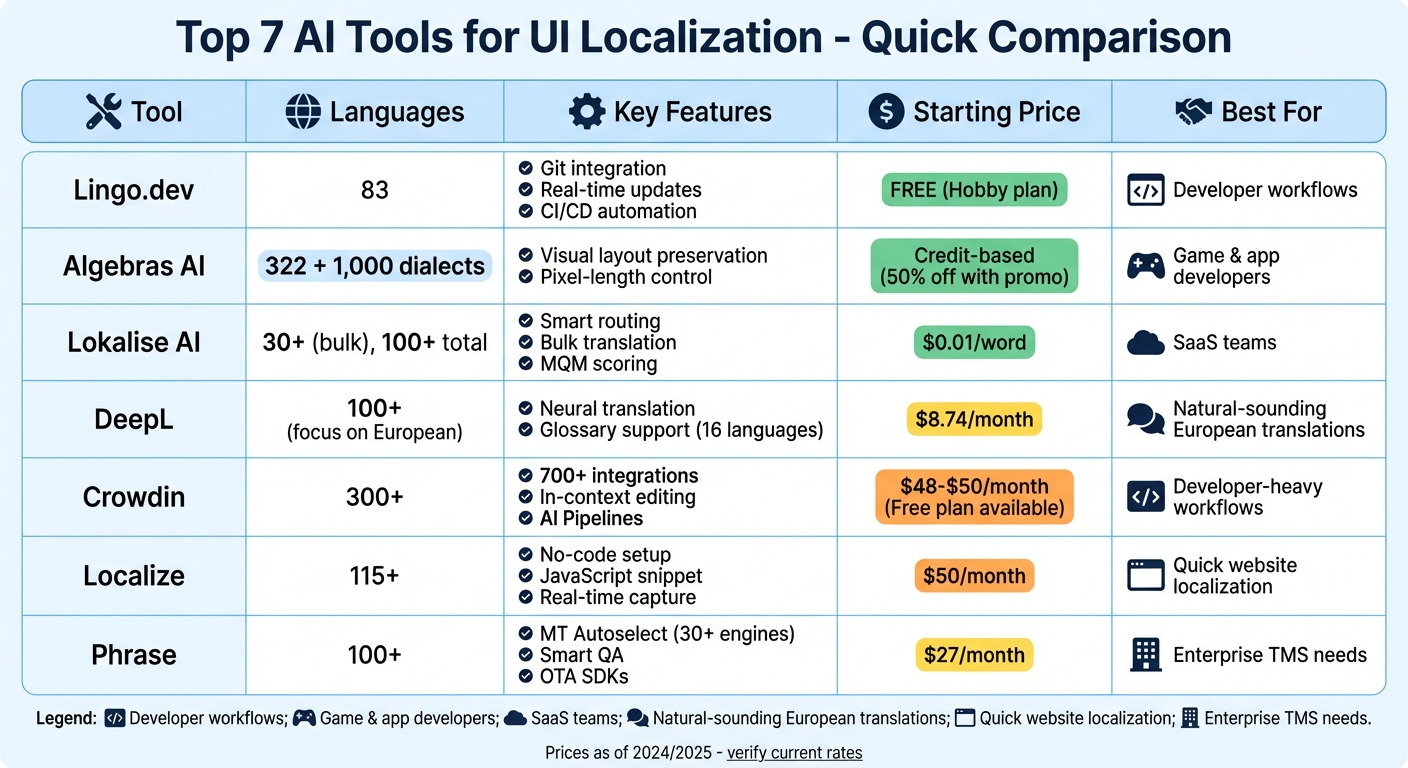
AI UI Localization Tools Comparison: Features, Pricing, and Language Support
How AI is Transforming Localization: What Works & What Doesn't 🤖
sbb-itb-94eacf4
1. Lingo.dev
Lingo.dev streamlines UI localization for developers by integrating directly into the Git workflow. It automates translations through pull requests, instantly translating UI strings into 83 languages as soon as code is committed. This allows engineering teams to stay focused on feature development while localization happens behind the scenes, effortlessly blending into the development process.
Integration Capabilities
Lingo.dev works seamlessly with CI/CD pipelines like GitHub Actions to pre-deploy translations. It supports widely used file formats such as JSON, CSV, and PO, and provides an open-source CLI and JavaScript SDK. These tools make it easy to handle dynamic, user-generated content with real-time translations. Additionally, its managed API is designed for context-aware localization, making it a go-to solution for databases, automated emails, and marketing content.
"Now with Lingo.dev, our engineers don't even think about localization – they just build features, and translations happen automatically in 36 languages." - Keith Williams, Head of Engineering, Cal.com
Key UI Localization Features
The platform's AI engine is designed to respect UI constraints, such as character limits, to avoid text overflow and ensure the layout remains intact. It also allows for customization, enabling teams to adjust translations to fit their brand's tone, idioms, and technical terminology. Lingo.dev simplifies handling complex UI elements like variables and plurals without requiring manual effort. For React projects, it includes an open-source compiler that adds multilingual support during the build process.
Pricing Tiers
Lingo.dev offers flexible pricing plans tailored to different needs, from hobbyists to large enterprises:
| Plan | Price | Monthly Words | Extra Word Cost | Key Features |
|---|---|---|---|---|
| Hobby | Free | 10,000 | N/A | 1 project, CI/CD integration, Brand Voice |
| Pro | $30/mo | 20,000 | $2.50 per 1,000 | Priority email support |
| Team | $600/mo | 100,000 | $0.25 per 1,000 | Unlimited projects, Web editor, Private Slack |
| Enterprise | Custom | Custom | Custom | SLAs, Dedicated support, Compliance features |
The free Hobby plan includes unlimited language support, making it an excellent choice for startups or side projects. Iuliia Shnai, Founder of Papermark, shared her experience of using Lingo.dev to instantly translate 80 files, enabling automatic documentation availability in multiple languages.
2. Algebras AI
Algebras AI specializes in preserving visual layouts while localizing user interfaces into an impressive 322 languages and over 1,000 dialects. Designed with game developers and app teams in mind, the platform ensures that design integrity remains intact across multiple markets. It’s particularly adept at handling complex languages like Japanese, Korean, and Chinese. By building on automation principles similar to Lingo.dev, Algebras AI takes localization a step further, focusing on maintaining the visual and functional consistency developers need.
Languages Supported
The platform extends its reach to underserved regions such as the Middle East, South Asia, and Central Asia. With its broad dialect support, teams can confidently target niche markets without losing important nuances or idiomatic expressions. Using a multi-agent AI approach, Algebras AI minimizes the need for manual proofreading, reportedly cutting localization timelines from weeks to mere minutes or days. This language versatility is complemented by seamless integrations across various development environments.
Integration Capabilities
Algebras AI works with popular tools like Unity and Unreal Engine, alongside offering a CLI and API for web and app projects. It supports GitHub Actions through its official "Algebras Translation Status" feature, which automatically identifies missing or outdated translation keys during builds. Additional integrations include Google Sheets, multiple CMS platforms, and TMS solutions, with native optimization for Next.js projects. Supported file formats range from JSON, YAML, and Android XML to iOS .strings, CSV, and PO.
Key UI Localization Features
Algebras AI ensures translations fit perfectly into user interfaces with pixel-length control, which measures text length and suggests concise synonyms to prevent overflow. Its smart routing system selects the best translation engine - be it DeepL, Google Translate, or NLLB - based on the content type and language pair. The platform also automates glossary extraction, identifying recurring terms to maintain consistency across all regions. For quality assurance, the CLI tool checks placeholder consistency, detects syntax errors, and flags outdated translations whenever source content changes. These features simplify the localization process, ensuring UI consistency and faster global rollouts.
Pricing Tiers
Algebras AI operates on a credit-based pricing model. New users can try the platform with a free trial that includes a demo project to explore its capabilities. For a limited time, users can apply the promo code "HUNTINGKITTY" to receive 50% off AI credits until May 31. For larger teams or studios with specific needs, custom pricing is available through demo consultations.
3. Lokalise AI
Lokalise AI simplifies UI localization across more than 100 languages and dialects. For bulk tasks, it can handle translations in over 30 languages at once. Its smart routing technology ensures content is directed to the most suitable AI model - whether it's GPT-4o, Claude 3.5, or DeepL - based on the specific language pair and context. This approach delivers translations up to 10 times faster than traditional methods, achieving approximately 80% accuracy on the first attempt.
Languages Supported
Lokalise AI is designed for teams working in multiple markets, supporting translations in over 30 languages simultaneously. To maintain brand consistency, users can upload style guides and glossaries. Features like automated QA checks and translation memory further ensure terminology stays consistent across projects.
Integration Capabilities
Lokalise AI integrates seamlessly into design, development, and CMS workflows. It offers a RESTful API with 95 endpoints and 33 webhooks to automate tasks. Designers can use plugins for Figma, Adobe, and Sketch to send and retrieve translations directly for layout testing.
For development teams, Lokalise AI integrates with GitHub, GitLab, Bitbucket, and Jira to streamline continuous localization. CMS connections include platforms like Webflow, Contentful, and WordPress. Mobile teams benefit from 10 pre-made SDKs for iOS and Android, enabling over-the-air updates without needing a new app release. In addition, Lokalise AI's in-context tools help tackle UI-specific localization challenges.
Key UI Localization Features
Lokalise AI's in-context editing allows translators to view screenshots of where strings appear in the UI, ensuring translations align with design elements like buttons and headers. The platform also includes a "Shorten" feature to adjust text for character limits and a "Rephrase" tool to modify tone or style directly within the editor.
To measure translation quality, Lokalise AI uses the MQM (Multidimensional Quality Metrics) framework, assigning a score from 0 to 100. Strings with low scores are flagged for human review. In 2024, Joaquín Muñoz, Localization Manager at Life360, used Lokalise AI to launch seven new languages, translating over 100,000 words per language. This process cut both time and costs by 80% compared to traditional methods.
"With AI we cut time in less than half and costs by 80%, so big savings in time and money with the same output at the end." - Joaquín Muñoz, Localization Manager, Life360
Pricing Tiers
Lokalise AI offers a 14-day free trial, including 200 complimentary AI words upon signup. Translation costs start at about $0.01 per word, with tiered pricing plans such as Pro and Enterprise available. Custom solutions can also be tailored for larger teams.
4. DeepL
DeepL sets itself apart with its ability to grasp context and subtle meanings in translations. Using proprietary neural networks and advanced language models, the platform translates around 70 million words every month, serving over 200,000 businesses worldwide .
Languages Supported
DeepL supports translations in over 100 languages and includes glossary functionality for 16 of them, allowing up to 30,000 custom entries . In independent tests, it scored 3 out of 5 for accuracy, surpassing both ChatGPT (2.5) and Google Translate (2.3). Businesses using DeepL have reported an impressive 86% boost in document translation efficiency.
Integration Capabilities
DeepL's REST API, available in both Free and Pro versions, makes it easy for developers to embed its translation tools into websites, apps, or SaaS platforms. It integrates smoothly with tools like Microsoft 365, Google Workspace, Zendesk, and popular browsers. Additionally, it connects with Translation Management Systems and CAT tools such as Phrase, Crowdin, and SharePoint.
"The documentation is clear, and the API does what it says it does. If you are a developer, you only need to read the documentation, and the API will do exactly what you want." - Rémy Berda, Founder and CTO of Weglot
These integrations pave the way for DeepL’s advanced UI localization features.
Key UI Localization Features
DeepL’s capabilities are designed to maintain the integrity of user interfaces during translations. It preserves layouts, designs, and formatting, supporting various file types like HTML, PDF, Word, PowerPoint, and Excel. Custom glossaries ensure consistent use of brand-specific or technical terms. Teams can also set style rules to control tone (formal or informal) and automate formatting, while translation memory speeds up the review process by reusing previously approved translations. The DeepL Agent, an AI-powered assistant, handles repetitive tasks like terminology checks and translation reviews.
"Thanks to cost reduction and freeing up our translators' time, we can now take on new translation projects, so it looks like our translation volume will continue to grow - it could even double or triple in the coming months." - Jakub Kalina, Head of Localization at Alza
Pricing Tiers
DeepL offers flexible pricing to match its robust features. The DeepL API Free plan allows up to 500,000 characters per month at no charge. For those needing more, the DeepL API Pro plan provides unlimited translation with enhanced data security (texts are not stored) and priority processing, all through usage-based pricing.
5. Crowdin
Crowdin stands out as a robust tool for UI localization, offering a wide array of integrations and AI-driven workflows. With support for over 300 languages and custom locales, it’s designed to help teams efficiently expand into global markets. The platform boasts over 700 integrations and supports scalable localization, with companies reporting they can produce content twice as fast and at one-third the cost of traditional methods.
Languages Supported
Crowdin’s capabilities extend to more than 300 languages and custom locales, accommodating over 100 file formats, including Java i18n and modern JavaScript libraries like Lingui. A case study focusing on Japanese UI localization highlighted the platform’s AI-driven context tools, which resulted in 71% of translations being approved by proofreaders without changes. Research has also shown that combining large language models, AI-extracted context, and screenshots can yield up to 95% valid translations for UI localization projects.
Integration Capabilities
Crowdin integrates seamlessly with tools like GitHub, GitLab, Bitbucket, and Azure Repos. It automatically extracts strings when new features are pushed and creates pull requests once translations are ready. For CMS platforms such as Webflow, Squarespace, Framer, and Shopify, Crowdin offers a proxy-based website translator, eliminating the need for code changes. Mobile SDKs for iOS and Android enable Over-the-Air (OTA) updates, allowing developers to fix typos or update translations in live apps without waiting for app store approvals. Additionally, its cross-platform CLI and RESTful API make it easy to integrate localization workflows into CI/CD pipelines like Jenkins, CircleCI, and GitHub Actions.
"Crowdin streamlined our translation process with a tight GitLab integration. By automatically presenting new strings to our community for translation, we're able to save time and get our community engaged quickly." - Jeremy Watson, Product Manager at GitLab
These integrations enhance Crowdin’s ability to manage localization efficiently.
Key UI Localization Features
Crowdin offers In-Context Editing, enabling translators to work directly within a live web interface or through an overlay, so they can see exactly where the text appears. Its AI can adjust or shorten UI text to fit layout constraints and character limits for different languages. The Context Harvester CLI collects contextual data and comments from source code, giving translators - both AI and human - clear, code-aware background information.
The platform also integrates with design tools like Figma, Adobe XD, and Sketch. This allows teams to localize designs and address layout issues or word expansion problems before development begins. The Visual Context Toolkit automatically tags screenshots, syncing designs with corresponding string keys to eliminate guesswork in translations. For quality control, AI-Driven Quality Assurance checks translations against brand guidelines, glossaries, and length restrictions, identifying errors before human review.
These features make Crowdin a powerful option for managing large-scale localization projects while keeping costs and errors in check.
Pricing Tiers
Crowdin’s pricing options cater to various needs:
- Free Plan: Includes 60,000 hosted words and one private project.
- Pro Plan: Adds support for 2 private projects and 2 integrations, including Android/iOS SDKs.
- Team Plan: Offers unlimited private projects, 5 managers, and 3 integrations with task-based access.
- Business Plan: Designed for larger organizations, it includes unlimited content, 10 managers, SAML SSO, SCIM, and priority support with SLAs.
Crowdin also has a "no surcharge" policy for AI usage, meaning users only pay the direct API rates of providers like OpenAI or Anthropic. For those without API keys, the platform offers Managed Services, allowing prepaid access to AI and professional translation services.
6. Localize
Localize uses a no-code approach to simplify UI localization, making it accessible even for teams without dedicated developers. With just one JavaScript snippet added to your site's HTML, you can start translating content in minutes. The system captures all content for review automatically and employs AI-powered translation to streamline the process.
Languages Supported
Localize supports over 115 languages, including right-to-left options and even niche ones like Klingon. Its AI Suite leverages natural language processing to handle context, grammar, and sentence structure. The Smart Select feature ensures translations are routed to the most effective AI engine - whether it's Google, DeepL, or OpenAI - based on the language pair. It also manages complex language rules like pluralization and variables without manual input.
Integration Capabilities
Localize's ease of installation is matched by its compatibility with a comprehensive site builder tools - over 40 systems in total. For web applications, the JavaScript SDK enables advanced integration, allowing content to be detected and managed programmatically. The REST API automates workflows and extends localization to backend services, API responses, and email platforms. A CLI tool offers a push/pull system for handling translations in mobile apps, while webhooks provide real-time updates when translations are added, updated, or removed.
The platform integrates with professional website builders such as WordPress, Shopify, Webflow, Squarespace, Wix, BigCommerce, Drupal, HubSpot, and Ghost.io. It also supports frameworks like React, Angular, Vue.js, and Django, along with server-side languages like Node.js, PHP, Python, and Ruby. Additionally, Localize works with tools like Zendesk, Freshdesk, Help Scout, Figma, and Framer.
"With the availability of a REST API, we can seamlessly extend the translation feature to our backend services. This includes supporting API responses and email services in various languages." - David Ishikawa, Product Director, Tabist
Tabist utilized the REST API to maintain consistent translations across their platform, resulting in a 32% boost in purchases. Similarly, Mimeo used Localize’s automated workflows to launch their platform in 15 languages, driving an impressive 6.9 million increase in site traffic.
Key UI Localization Features
Localize offers intuitive tools that simplify the translation process. Its on-page visual editor allows teams to edit translations directly within the live UI, ensuring they align with design constraints before going live. This in-context editing complements its no-code setup. The platform’s AI Suite provides two options: AI Assistant for human-in-the-loop editing and AI Agent for fully automated workflows.
The system automatically captures new content in real time and updates translations without requiring manual intervention. For teams needing extra security, the Advanced Platform includes SAML SSO and compliance-focused frameworks.
"It's so simple to drop in the Localize code snippet and start translating web pages immediately! And the best part is, it lowered our human translation costs by more than 40%!" - Nicole Hermoso, Product Manager, Submittable
Submittable expanded their app to over 20 languages with Localize, translating 33,000 words and cutting human translation costs by 40%.
Pricing Tiers
Localize provides a 15-day free trial with access to all features - no credit card required. Basic plans range from $50 to $625 per month, ideal for solo creators or small businesses with static sites, and include email-only support. Advanced and Enterprise plans, starting at $3,500 per month, cater to larger companies needing dynamic content management, dedicated customer success managers, and priority support. Basic plans accept credit card payments only, while Advanced plans allow invoice billing.
7. Phrase
Phrase builds on tools like Lingo.dev and Lokalise AI by offering an advanced translation selection algorithm that takes localization to a new level. With support for 100+ languages, it combines AI-powered translation with automation to handle scalable UI localization. Its MT Autoselect feature evaluates 30+ translation engines - including DeepL, Google, and Amazon - to choose the best option for each language pair and content type. This eliminates the need to rely on a single machine translation engine, making it a standout in UI localization.
Integration Capabilities
Phrase integrates with over 50 design, development, and CMS tools, streamlining advanced web building workflows. It connects directly with platforms like WordPress, Contentful, Adobe Experience Manager, Sitecore, and Optimizely. For developers, it offers APIs (Strings, TMS, Language AI, Studio), webhooks, and CLI tools to sync translation keys and automate CI/CD pipelines. The Over-the-Air (OTA) SDKs for Android, iOS, and web apps allow teams to push translated UI strings into live applications instantly, bypassing app store approvals.
"Lyst has now designed a process where Phrase allows us to have the content ready on our sites within 1 minute since the translators add or update their translations. We are saving an average of 48 hours on engineering time, each time we deploy a new feature." - Enrique Quilez, Localization Manager, Lyst
Design teams benefit from integrations with Figma and Sketch, which enable real-time previews of translations directly within the original designs. This helps identify layout issues early, saving time before handoff. In 2025, a principal system analyst shared how their organization used the Adobe Experience Manager integration to translate their website into 10 languages. The in-context preview feature ensured that translations fit seamlessly into the page layout, reducing QA time and speeding up their launch timeline.
These integrations make it easier for teams to deliver polished, localized user interfaces.
Key UI Localization Features
Phrase's in-context editing feature allows linguists to view translations in their final layout as they work. Its Smart QA system automatically checks for issues like broken placeholders, character length limits, and layout-breaking strings before publishing. The platform also ensures compatibility with Right-to-Left (RTL) languages and non-alphabetic scripts, maintaining layout integrity.
The Phrase NextMT engine offers context-aware translations, handling details like numbers, tenses, and gender more precisely than standard machine translation. Additionally, the Auto Adapt feature uses generative AI to fine-tune tone, style, and demographic-specific nuances. A Quality Performance Score (QPS) based on the MQM 2.0 framework flags low-quality translations for human review. A Forrester study found that Phrase delivers a 527% return on investment, helping customers save nearly $2.8 million through efficient scaling.
Pricing Tiers
Phrase provides a free trial for its Strings product. The Freelancer plan starts at $27 per month (billed annually) and includes basic CAT tools and integrations with code repositories. The Software UI/UX and Professional plans, priced at $525 per month (billed annually), cater to product teams with integrations for Figma, Jira, and GitHub. The Team plan, at $1,045 per month (billed annually), includes unlimited TMS seats. For larger needs, Business and Enterprise plans offer custom pricing, with Enterprise plans including premium support and high-tier integrations like AEM and Contentful.
Feature Comparison
Choosing the right AI localization tool depends on your workflow, budget, and technical requirements. The table below breaks down how major platforms tackle context-aware translation and design integration. Following the table, you'll find insights to help you better understand the strengths of each tool.
| Tool | Language Support | Key Integrations | Main Features | Starting Price | Best For |
|---|---|---|---|---|---|
| Lokalise AI | Unlimited | Figma, Sketch, GitHub, Slack | Bulk translation, context-aware rephrasing, one-click SEO optimization | $120/month per user | SaaS UI string localization and cross-functional teams |
| DeepL | ~30 (primarily European) | Limited direct integrations | Neural machine translation and document translation with format preservation | $8.74/month (Pro) | Natural-sounding translations for European languages and marketing |
| Crowdin | Unlimited | 600+ tools including GitHub, GitLab, Figma, Slack | AI Pipelines for multi-step workflows and developer-centric automation | $48–$50/month | Developer-centric workflows and high-volume content |
| Localize | Unlimited | Web plugin for quick deployment | Website localization via a JavaScript snippet | Not specified | Quick website localization via a web plugin |
| Phrase | 100+ | 50+ tools including WordPress, Contentful, AEM, Figma | MT Autoselect (30+ engines), in-context editing, Smart QA, OTA SDKs | $27/month (Freelancer) | High-volume structured content and enterprise TMS needs |
Each tool brings distinct advantages depending on your localization needs. DeepL, for example, is a standout choice for translating Germanic and Romance languages, with its neural engine excelling at capturing linguistic subtleties. However, its language support is limited to around 30, primarily European, languages.
Crowdin offers extensive integration options - over 600 tools, including GitHub and Figma - making it a go-to for developer-centric workflows. It also provides a free plan for smaller teams, making it accessible for various project sizes.
For enterprise teams managing complex processes, Phrase stands out. A Forrester study highlighted its impressive performance, reporting a 527% return on investment and cost savings of nearly $2.8 million for its customers.
To determine the best fit, test these platforms using your actual UI strings. This hands-on approach will help you gauge how well each tool aligns with your specific localization strategy.
Conclusion
The strengths of AI-powered tools in UI localization are clear, offering businesses a way to expand their global reach more effectively. By streamlining workflows, companies can reduce time-to-market by up to 80% and cut translation errors by nearly half. Additionally, 96% of B2B leaders report seeing positive returns from localization efforts, with 65% achieving at least threefold ROI.
These tools are not just about efficiency; they align with the latest market demands. Selecting the essential tools for website creation depends on your specific needs. For example, Crowdin is ideal for developer-heavy projects that require continuous updates, while enterprises handling large-scale content should prioritize tools with strong quality assurance and scalable workflows. On the other hand, Lokalise is perfect for design-driven teams, thanks to its integrations with platforms like Figma and Adobe XD.
A smart approach is to test your UI strings with a pilot project. This allows you to evaluate translation accuracy, system compatibility, and how well the tool handles your specific content. Features like in-context previews can also help you avoid layout issues, such as truncation or broken designs.
Consumer preferences further highlight why localization matters. Around 80% of customers shy away from brands that don’t offer language support, and localized experiences can improve customer satisfaction by an average of 20%. As Crowdin aptly puts it, "AI in localization is not about replacing people; it is about making them more efficient".
These tools provide a strong starting point for creating culturally relevant and efficient localization processes.
FAQs
How do I choose the right AI localization tool for my workflow?
To pick the best AI localization tool, start by checking if it supports the languages and file formats you need, such as JSON or HTML. Make sure it works seamlessly with your existing tools, like your CMS or design software, and look for automation features like AI-assisted translation and version control. Keep scalability, user-friendliness, and budget in mind. Reading user reviews and trying out demos are great ways to ensure the tool aligns with both your current requirements and future goals.
How can I prevent translated UI text from breaking my layout?
When designing a user interface (UI) that will be translated into multiple languages, it's crucial to plan for localization from the very beginning. This means accounting for factors like text direction (e.g., right-to-left for languages like Arabic), differences in character sets, and layouts that can scale to accommodate varying text lengths.
Testing with translated content is another essential step. This ensures that all components can adapt seamlessly to different languages without breaking the design. Additionally, integrating regional and local context into your UI helps create an experience that feels intuitive and user-friendly for diverse audiences.
By following these steps, your UI can stay functional, visually consistent, and user-friendly - no matter the language.
When should I use in-context editing vs fully automated translation?
In UI localization, in-context editing is key when precision and nuance matter most. This approach allows translators to view text within the actual interface, helping them ensure the text fits seamlessly and maintains consistency across the design.
For situations requiring speed and large-scale deployment, fully automated translation is a solid choice. It works well for quickly translating extensive content or rolling out multilingual versions. However, pairing it with human review is essential to fine-tune the tone and improve overall accuracy.