Translating text can break your UI. Here's why: when English is translated into languages like German or French, the resulting text often grows by 25–35%. For shorter strings, this growth can be even more extreme - up to 300%. Without proper planning, buttons, labels, and other UI elements might overflow, truncate, or misalign, making your interface confusing or unusable.
To solve this, use these strategies:
- Dynamic Layouts: Flexible designs that adjust to longer text using CSS tools like Flexbox and Grid.
- String Management Tools: Test layouts early with pseudo-localization and enforce character limits.
- AI Translation Platforms: Automatically rephrase text to fit space constraints while keeping meaning intact.
Each method has strengths and weaknesses, but combining them can ensure your UI works smoothly across multiple languages. For example, adding a 30–50% buffer in designs and using tools like Figma's Auto Layout can prevent issues before they arise. The result? Interfaces that remain functional and user-friendly, no matter the language.
Text size in translation | Why translated text breaks your layout
sbb-itb-94eacf4
1. Dynamic Layout Design
Dynamic layout design relies on flexible containers that automatically adjust to accommodate text expansion. Instead of using fixed widths, implementing min-width and max-width constraints with padding ensures that elements like buttons and labels adapt naturally. For example, a button labeled "Save" in English might expand significantly when translated to "Speichern" in German, which can increase the text length by up to 150%.
Flexibility in Handling Text Expansion
CSS tools like Flexbox and Grid are excellent for creating layouts that adapt automatically. These tools allow elements to re-align or wrap as content grows. For instance, German text often expands by 30–35%, while Polish translations for phrases like "Low battery" can increase by as much as 65%. Using logical CSS properties such as margin-inline-start and padding-inline-end ensures that layouts remain responsive, even for right-to-left (RTL) languages.
To prevent layout issues with long words, properties like white-space: normal and word-wrap: break-word are essential. These settings allow lengthy words - common in languages like German and Finnish - to break into multiple lines rather than overflowing their containers. For example, a word like "Eingabeverarbeitungsfunktionen" in German will wrap neatly without disrupting the layout, provided proper wrapping configurations are in place.
Ease of Integration
Modern design tools like Figma's Auto Layout, paired with container queries now supported in 2026 browsers, streamline the process of translating designs into responsive code. Container queries allow individual components to adjust their layout dynamically - for example, switching from horizontal to vertical stacking based on available space. To prepare for text expansion in European languages, designers should include a 30–50% space buffer in their initial layouts.
Pseudo-localization is another helpful tool for identifying potential layout problems early. By artificially expanding text by 30–50% during development, this method highlights issues like truncated navigation labels or disappearing buttons before translations are finalized. These proactive strategies ensure smoother transitions to multilingual interfaces, setting the stage for managing string constraints effectively.
User Experience Impact
Dynamic layouts prioritize vertical expansion over horizontal growth, which minimizes disruptions to the overall UI structure. Stacking elements vertically is generally less intrusive than horizontal adjustments, making the interface more accessible and visually balanced. In cases where truncation is unavoidable, combining text-overflow: ellipsis with tooltips ensures users can still access the full text by hovering over the truncated content. This thoughtful approach balances aesthetics with functionality, creating interfaces that feel natural and intuitive in every language.
Up next, we’ll dive into string management tools and how they can help identify layout issues early in the design process.
2. String Management Tools
String management tools streamline collaboration between designers, developers, and translators by automating the extraction of text (or "strings") from code. They also provide crucial visual context, like screenshots or live UI previews, showing exactly where text appears - whether in buttons, menus, or headers. This level of clarity helps identify layout problems early and allows translators to choose wording that fits seamlessly within the design. These tools also pave the way for automating tasks like managing character limits and rephrasing translations.
Handling Text Expansion with Ease
Modern platforms are equipped to handle text expansion challenges. They enforce character limits and even use AI tools, like ChatGPT-4o, to shorten translations that exceed space constraints while keeping their meaning intact. For instance, translations that surpass specific thresholds - such as 120% for Polish or 130% for German - are flagged for review.
Another powerful feature is pseudo-localization, which simulates translations during development to test string integrity. As the IntlPull team aptly puts it:
"If your UI breaks with pseudo-localization, it'll break with real languages".
Seamless Integration with Design and Development
String management tools integrate smoothly with popular design platforms like Figma, Sketch, and Adobe XD. This allows designers to test how text expansion impacts layouts right from the design phase, long before any coding begins. Tools like TranslationOS and Localize go a step further by automating string extraction and plugging directly into CI/CD pipelines. This makes localization a natural part of the development cycle. Additionally, these tools fit effortlessly into Git-based workflows, flagging new strings for translation and review as part of the standard release process.
Enhancing the User Experience
Consistency in terminology is key to creating user-friendly interfaces. Centralized glossaries and style guides ensure that functional terms like "Save" or "Delete" remain uniform throughout the interface, reducing user confusion. String management tools also address the challenges of text size differences across languages. For example, languages like Chinese or Japanese can shrink text by 10–30%, while others may expand significantly. These tools help maintain minimum button dimensions (44px by 44px) to comply with WCAG accessibility standards. By balancing text expansion and contraction, they ensure interfaces stay intuitive and visually appealing, no matter the language.
3. AI-Assisted Translation Platforms
AI-assisted translation platforms take the concept of dynamic layouts and string management to the next level. They use intelligent automation and real-time adjustments to handle text expansion more effectively. These platforms ensure content fits within UI constraints while preserving its original meaning. For instance, Crowdin's Agentic AI scans entire projects and adjusts text length accordingly. You can even set specific "User Rules" - like instructing the AI to keep mobile button translations within 10% of the source length - and the platform will automatically rephrase the content to meet those parameters.
Flexibility in Handling Text Expansion
When translations exceed space limits, these platforms step in to rephrase them automatically. Tools like Pairaphrase, which integrate with ChatGPT, let you prompt the AI with commands like "reduce character count" or "rephrase for conciseness" while ensuring the message remains intact. This is especially helpful for languages like German and French, which are known for significant text expansion. Platforms also enforce specific length limits for each language - such as capping German translations at 130% of the English source - and flag any translations that exceed these thresholds. Crowdin highlights this capability:
"Agentic AI, guided by your User Rules, makes fitting translated text into strict length limits efficient and accurate".
By combining these rephrasing tools with dynamic layouts and proactive string management, AI platforms offer a well-rounded solution to text expansion challenges.
Ease of Integration
These platforms are designed to integrate effortlessly with design tools and CI/CD pipelines, enabling real-time layout testing and translation updates. For example, better-i18n connects directly with CI/CD pipelines to streamline updates. Visual context tools further enhance the process by providing translators with screenshots and real-time previews. These previews show exactly where the text will appear and how much space is available, making it easier to deliver accurate translations.
User Experience Impact
AI-assisted platforms don’t just streamline workflows - they also improve user experience by addressing layout issues proactively. Like pseudo-localization, AI-driven simulations ensure that every translation fits seamlessly into the UI. This is critical when you consider that over 75% of internet users prefer to shop in their native language, and more than half avoid sites that only offer English. These platforms analyze translations in real time, ensuring they match the audience's context in both tone and length. The result? Interfaces that feel intuitive and natural, whether your users speak German, Chinese, or Arabic.
Pros and Cons
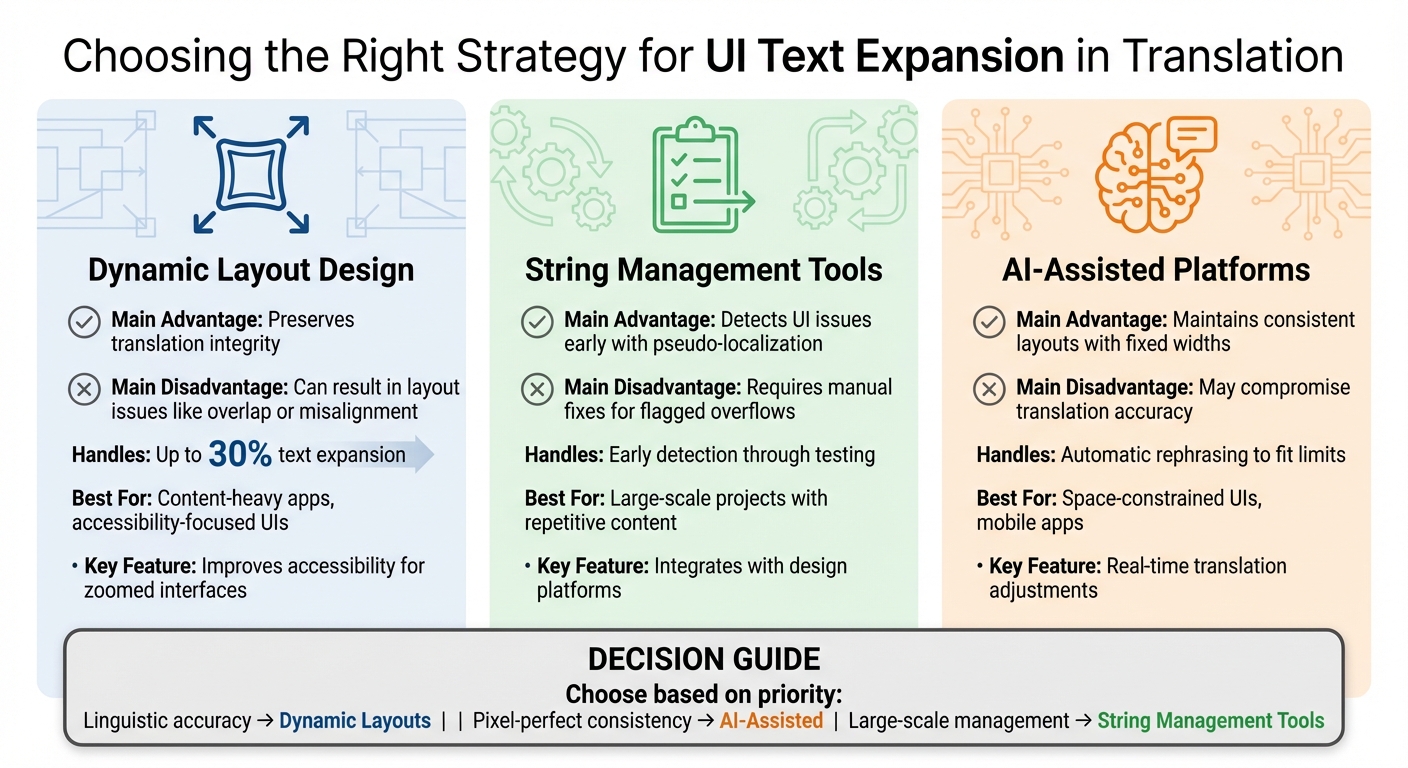
Comparison of UI Text Expansion Strategies for Translation
When tackling text expansion challenges, it's essential to weigh the strengths and weaknesses of each strategy. Here's a breakdown of how different approaches handle these issues.
Dynamic layout design can handle up to 30% text expansion - commonly seen in German or French translations - while improving accessibility for users who rely on zoomed interfaces. This approach, discussed in detail earlier, offers flexibility but comes with risks. Without defined minimum and maximum widths, layouts can become unpredictable, leading to off-screen content, overlapping elements, or disrupted vertical alignment.
String management tools streamline workflows by using pseudo-localization tests and contextual screenshots to catch layout issues early. These tools integrate well with design platforms, making testing more efficient. However, flagged overflows still require manual adjustments, which can slow the process.
AI-assisted platforms take a different route by modifying the content rather than the UI. These platforms rephrase translations to fit character limits while maintaining the intended meaning, ensuring layouts remain consistent. The downside? Accuracy can suffer. As noted in PTC's documentation, "PTC always prioritizes the best possible translation first, so a shorter retranslation may not be as accurate". While this approach reduces the need for extensive UI coding upfront, it often requires manual review to ensure the rephrased text aligns with your brand's tone.
| Strategy | Main Advantage | Main Disadvantage | Best For |
|---|---|---|---|
| Dynamic Layout Design | Preserves translation integrity | Can result in layout issues like overlap or misalignment | Content-heavy apps, accessibility-focused UIs |
| String Management Tools | Detects UI issues early with pseudo-localization | Requires manual fixes for flagged overflows | Large-scale projects with repetitive content |
| AI-Assisted Platforms | Maintains consistent layouts with fixed widths | May compromise translation accuracy | Space-constrained UIs, mobile apps |
Selecting the right strategy depends on your project's priorities. If linguistic accuracy is your top concern, dynamic layouts give translators the freedom to fully express the original meaning. For pixel-perfect consistency across languages, AI-assisted platforms can adjust text to fit the UI seamlessly. Meanwhile, for teams managing extensive string libraries across products, string management tools provide the support needed to handle large-scale text expansion challenges effectively.
Conclusion
Managing text expansion effectively requires a mix of thoughtful design, proactive planning, and smart tools tailored to your project's needs. Different languages naturally expand or contract during translation, which means your designs need to be flexible enough to handle these shifts without compromising usability or aesthetics.
One way to handle this is by using dynamic layouts and flexible containers. These adapt to text changes, especially in mobile apps where screen space is tight. AI-driven tools can also help by rephrasing translations to fit better, but it’s crucial to review these outputs for accuracy.
Another key tactic is adopting a "Localization-by-Design" approach early in the process. Using pseudolocalization to simulate a 30–50% text increase can highlight potential issues before they escalate, saving both time and money. As the Glance Expert Guide wisely notes:
"Good localization isn't about squeezing text into spaces that are too small - it's about creating designs that breathe and adapt naturally".
Your choice of target languages should also shape your technical decisions. For example, languages like Arabic or Hebrew require logical CSS properties to handle text expansion and support right-to-left layouts. On the flip side, languages like Chinese or Japanese, which can contract by 10–30%, present the challenge of managing extra whitespace.
For web projects aimed at global audiences, localization-aware tools - like those featured on platforms such as Top Website Builders (https://topwebsitebuilders.org) - can help automate text expansion management, streamlining the process.
The key is finding a balance between linguistic precision, visual harmony, and development efficiency. Focus on high-visibility areas for manual review, automate where risks are lower, and design with a 30–40% buffer using relative units. Testing with real translations ensures your multilingual interface feels seamless and natural.
FAQs
Which UI components break first after translation?
When it comes to UI components, elements like buttons, navigation menus, and forms are especially vulnerable to breaking after translation. One common culprit? Text expansion. When translated, text often grows longer, which can lead to problems like overflow, cut-off text, or distorted layouts if the design isn't prepared to handle it.
Focusing on flexible layouts and scalable designs is key to avoiding these issues. By building interfaces that can adapt to varying text lengths, you can ensure your UI remains functional and visually appealing across different languages.
How can I test text expansion before translations?
When preparing for text expansion, try using prototype or mockup tools to input sample translations with varying lengths. For example, simulate a 30% increase for German or a 10-15% decrease for Korean. This approach helps you spot potential layout issues, text overflow, or UI breakage early on. By addressing these problems upfront, you can ensure your interface handles different languages smoothly before diving into the actual translation process.
When should I rephrase translations vs change the layout?
When text length creates layout problems, like overflowing elements or diminished functionality, opt for concise translations to keep things manageable. Adjust the layout when text variations - whether longer or shorter - necessitate resizing containers or tweaking spacing to preserve usability. Use rephrasing for small fixes and layout adjustments for more structural changes to maintain a clean and functional design.