Inconsistent terminology can ruin localization efforts. It confuses users, increases costs, and damages your brand. When terms like "Settings" and "Adjustments" are used interchangeably, users lose trust, support tickets pile up, and translation teams face delays. Worse, mistakes in regulated industries like healthcare can lead to serious consequences.
Here’s why consistency is crucial:
- User experience: Clear, predictable terms reduce confusion and build trust.
- Cost savings: Consistent terminology cuts localization costs by up to 90% by minimizing errors and rework.
- Faster delivery: Glossaries and Translation Memory tools speed up projects by reusing approved terms.
- Brand strength: Unified language across platforms strengthens your identity and improves SEO.
Solutions include:
- Creating glossaries or termbases to define key terms and avoid forbidden ones.
- Using CAT tools to enforce real-time consistency.
- Establishing team workflows to keep terminology aligned.
The Problem: How Inconsistent Terminology Hurts Localization
How It Affects User Experience
When terms don't match between interfaces and documentation, users are left scratching their heads. Imagine a button labeled "Heading" in the interface but referred to as "Title" in the help guide - this seemingly minor discrepancy can waste at least 20 seconds per user interaction. Multiply that by thousands of users, and the issue becomes far more than a small annoyance.
It gets worse when terminology varies across platforms. For instance, if a website calls a feature "Datenschutz-Modus", but the mobile app refers to it as "Privatsphären-Modus", users may wonder if they’re even using the same product. This inconsistency doesn’t just confuse - it undermines trust and makes your brand look unpolished.
"Brand trust depends on clarity. When customers encounter consistent terminology across interfaces, documentation and support, confidence increases. When terms shift unpredictably, trust erodes." – Jonny Stringer, Content Marketing Specialist, RWS
The ripple effect extends to support teams. Users unable to find features because of mismatched terms are more likely to submit support tickets. In regulated industries like healthcare, the stakes are even higher - terminology inconsistencies can lead to critical errors, such as incorrect medication dosages.
These examples highlight how inconsistent terminology can derail a seamless, localized user experience.
Higher Costs and More Work
The impact of inconsistent terminology doesn’t stop at user confusion - it also hits budgets and timelines hard.
When translators encounter inconsistent terms, they often have to pause for clarification or extra research. This slows down projects and inflates costs. And the financial consequences can be staggering. For example, a medical device manufacturer faced lawsuits totaling millions after incorrect German labeling led to 47 patients receiving improperly installed prostheses.
"Manual terminology cleanup is a tax on growth. Every hour a developer or reviewer spends fixing a 'Business Plan' vs. 'Pro Plan' naming error is an hour stolen from product innovation." – Mia Comic, Writer, Lokalise
The problem escalates when AI translation tools are involved. Without clear terminology guidelines, these tools can spread errors across multiple languages, creating a snowball effect. Fixing these mistakes manually is not only expensive but also time-consuming. Research shows that proper terminology management can cut localization costs by up to 90% by reducing human errors and the need for rework.
The takeaway? Inconsistent terminology doesn’t just slow things down - it drains resources that could be better spent elsewhere.
Impact on Brand and SEO
Beyond user confusion and operational headaches, inconsistent terminology also weakens your brand and hampers SEO efforts.
When terminology drifts across markets, it fragments your brand identity. For example, inconsistencies between marketing materials and interface language can disconnect customers from your messaging.
"Terminology drift compounds across touchpoints - customer support documentation, email campaigns, in-app messaging, and social media - fragmenting your brand identity in international markets." – Ambeteco
Search engine visibility takes a hit too. If your product uses "Settings" but your help documentation says "Ajustes", users searching for support may struggle to find relevant content. Similarly, literal translations of keywords can fail to match user search behavior. For instance, "needle-nose pliers" might be translated as "long-nose pliers", leading to poor search rankings and reduced visibility. These gaps hurt both user self-service and organic traffic. Research shows that maintaining consistent brand presentation across platforms can boost revenue by up to 23%.
In short, inconsistent terminology doesn’t just confuse - it weakens your brand, disrupts SEO, and costs you money.
sbb-itb-94eacf4
AI Translation: How to Use a Glossary & Style Guide for On-Brand Results
Why Consistent Terminology Matters
Let’s explore how a uniform approach to terminology can make a big difference after considering the downsides of inconsistency.
Better User Trust and Satisfaction
Using the same terms across interfaces, help docs, and marketing materials makes life easier for users. They don’t have to pause and wonder if "Settings" and "Adjustments" mean the same thing - they just know. This predictability creates trust and makes your brand appear polished and reliable.
For industries like healthcare and legal services, consistent terminology isn’t just about looking good - it’s about safety.
"Terminology precision in regulated industries isn't a quality preference - it's a patient safety imperative with life-or-death implications." – Ambeteco
Even outside these critical areas, clear and consistent language saves users time and frustration. When people can find what they need without confusion, they’re more likely to stay engaged. Research backs this up: 65% of online shoppers prefer content in their own language, and when that content uses clear, familiar terms, satisfaction improves significantly.
Beyond building trust with users, consistent terminology also makes internal processes smoother.
More Efficient Localization Teams
For localization teams, having standardized terms removes a lot of guesswork. Translators don’t have to stop and ask, "Should we use 'Dashboard' or 'Control Panel'?" Instead, they can rely on a centralized glossary and keep the project moving. This reduces back-and-forth communication and significantly shortens quality assurance (QA) cycles.
The time savings are real. Using a glossary and Translation Memory can cut translation turnaround time from six days to just one. Translators can reuse approved terms that have already been vetted instead of starting from scratch every time. This also improves Machine Translation (MT) post-editing, as AI tools perform better when they have clear guidelines.
"Terminology management is not administrative overhead. It is a strategic capability that supports quality, efficiency and trust across the localization lifecycle." – Jonny Stringer, Content Marketing Specialist, RWS
When everyone uses the same set of terms, teams spend less time fixing mistakes and more time delivering results.
Lower Costs and Faster Delivery
Consistency doesn’t just make teams more efficient - it also saves money. Translation management software with built-in glossaries can reduce costs by up to 90% by cutting down on errors, unnecessary communication, and time spent searching for terms. When translators don’t have to repeatedly translate the same concepts due to naming inconsistencies, every project becomes more cost-effective.
The financial benefits go beyond translation. A consistent brand presentation across markets can boost revenue by up to 23%, and companies that align their linguistic assets have reported a 73% increase in active users. Faster time-to-market is another advantage - you can launch products globally without delays caused by terminology debates.
| Benefit Category | Impact of Consistent Terminology |
|---|---|
| Translation Cost | Reduces costs by up to 90% by minimizing human error and search time |
| Turnaround Time | Cuts turnaround time from 6 days to 1 day with automation and term reuse |
| Revenue | Consistent brand presentation can increase revenue by 23% |
| User Experience | Reduces support tickets and builds user trust with predictable UI |
The takeaway? Investing in consistent terminology saves time, reduces costs, and strengthens customer relationships - all while delivering faster and more reliable results.
Solutions for Maintaining Consistent Terminology
Keeping terminology consistent is key to building user trust and ensuring smooth communication. By combining the right tools with effective team processes, you can create a workflow that minimizes errors and keeps your terminology aligned across all projects.
Creating and Using Glossaries and Termbases
A glossary is your first line of defense against inconsistent terminology. Start by identifying terms that absolutely cannot change - like product names, UI elements (e.g., buttons, menus), brand-specific language, and frequently used words (those appearing 50+ times). To keep it manageable, begin with 30–100 essential terms.
Have native speakers and subject matter experts review these terms for accuracy. Cross-checking with industry norms and competitor usage can help ensure your terms meet user expectations. Don’t stop at just listing translations - include definitions, parts of speech, usage examples, and even "forbidden" terms to steer clear of near-synonyms that might technically work but don’t fit your brand voice.
"A glossary or termbase is the single most direct way to cut [rework costs]." – Maria Scheibengraf, Operations Manager, Crisol Translation Services
Once your glossary is ready, upload it to your Computer-Assisted Translation (CAT) tools or Translation Management System (TMS). These tools can highlight approved terms for translators in real time, making it easier to maintain consistency. Plan regular updates - quarterly or after major product launches - to keep your glossary relevant and ensure someone is responsible for its upkeep.
Using CAT Tools and Translation Memory
CAT tools are a game-changer for terminology consistency. They scan your source text, highlight approved terms, and suggest correct translations on the spot. Translation Memory (TM) systems take it a step further by storing previously translated content, so you can reuse exact matches and maintain stylistic consistency across projects.
For example, in 2025, a tech company localizing its mobile app into 18 languages used TM to pre-fill 55% of the text. This approach cut translation time by 35% and reduced costs by 25%. Automated Quality Assurance (QA) features in these tools can flag forbidden terms or deviations from your glossary before the content is finalized.
"The CAT tool automatically highlights glossary terms in the source text and suggests the approved translation, helping to enforce consistency in real time." – Carla Salles, Project Manager, Interpro
Set up your CAT tools to alert translators when they use restricted terms, and consider cloud-based solutions so updates are instantly accessible to everyone. Modern machine translation engines can also integrate glossaries, ensuring your brand-specific terms are applied right from the start of the translation process.
Team Best Practices
While tools are essential, strong team processes are just as important. Effective collaboration between product managers, marketers, legal teams, and linguists ensures that your terms are accurate, brand-aligned, and contextually appropriate. You can also create a layered glossary system - one for organization-wide terms and another for project-specific needs.
Adding context is a huge help for translators. Include screenshots or sample sentences in your termbase to show how terms are used in real-world scenarios. Set clear approval timelines - like 3 business days for standard terms and 4 hours for urgent, launch-critical terms - to keep the process moving. Allow translators to suggest new terms directly within their tools, which can then be reviewed by terminology managers.
"Most term bases fail because they live somewhere where nobody works. A spreadsheet gets created... and then the real work happens in the editor." – Mia Comic, Lokalise
Track metrics like Errors Per Thousand (EPT) and Time to Edit (TTE) to measure how well your terminology is being implemented. Keep in mind that about 15% of translation project costs come from rework caused by inconsistent terminology. By adopting these strategies, you’ll save time, reduce costs, and ensure your brand’s voice stays consistent across all markets.
Comparison: Glossaries vs. Termbases
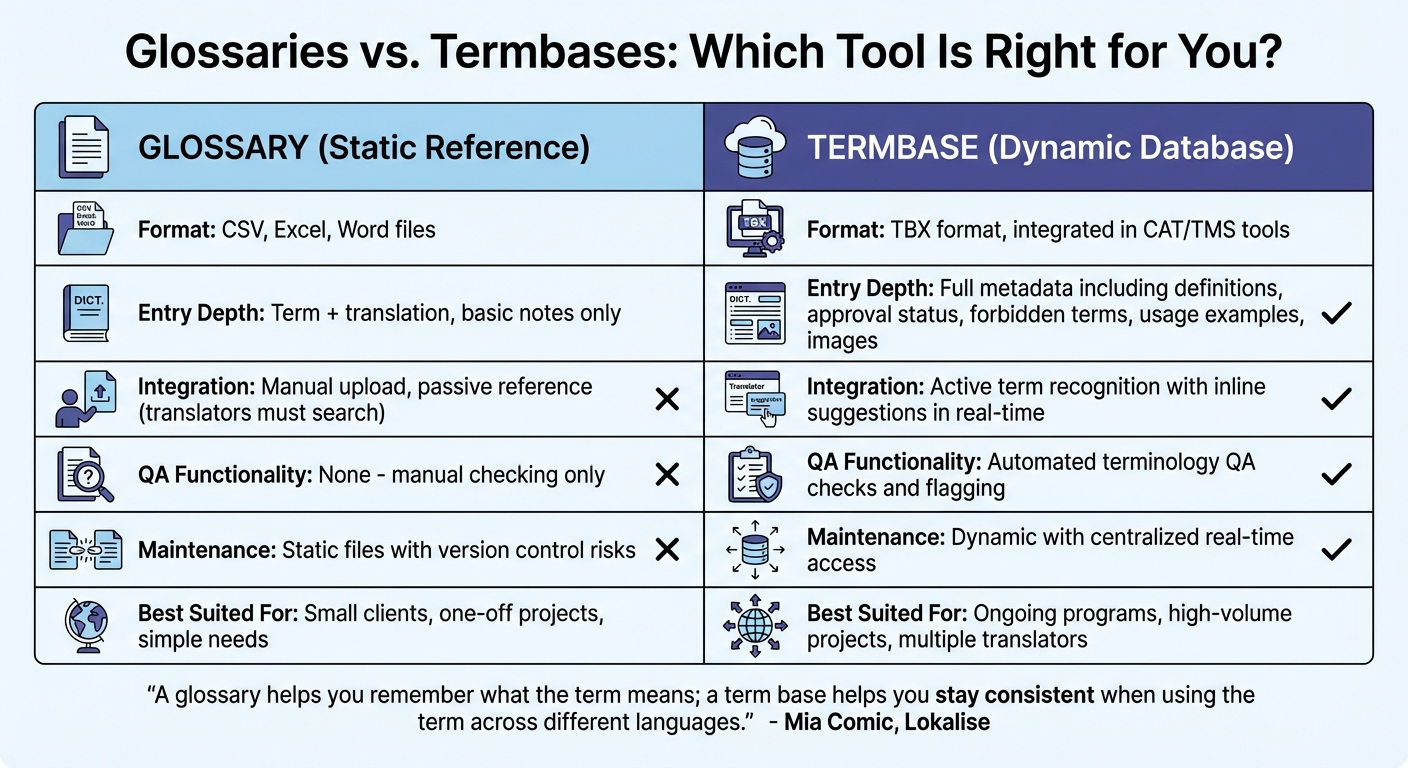
Glossaries vs Termbases: Key Differences for Localization
Glossaries and termbases both aim to ensure consistent terminology, but they serve distinct purposes and operate differently. A glossary is essentially a straightforward list of key terms paired with their approved translations. Typically stored in formats like Excel or CSV, it acts as a static reference tool for translators.
A termbase, on the other hand, is a more advanced tool - a dynamic database housed in specialized software. It doesn’t just store translations; it includes detailed metadata like definitions, context, approval status, usage examples, and even forbidden terms. As Mia Comic from Lokalise puts it:
"A glossary helps you remember what the term means; a term base helps you stay consistent when using the term across different languages."
The key difference lies in how they integrate into workflows. Glossaries require manual searches, meaning translators must actively look up terms. In contrast, termbases use active term recognition, automatically identifying terms in the source text and suggesting approved translations in real time. Termbases also bring an added layer of functionality: automated quality checks. They flag instances where approved terms are misused or omitted, something glossaries can't handle.
| Feature | Glossary (Static Reference) | Termbase (Dynamic Database) |
|---|---|---|
| Format | CSV, Excel, Word | TBX, integrated in CAT/TMS tools |
| Entry Depth | Term + translation, basic notes | Full metadata: definitions, status, forbidden terms, images |
| Integration | Manual upload, passive reference | Active term recognition, inline suggestions |
| QA Functionality | None (Manual check only) | Automated terminology QA checks |
| Maintenance | Static; version control risks | Dynamic; centralized real-time access |
| Best Suited For | Small clients, one-off projects | Ongoing programs, high-volume, multiple translators |
For smaller, one-off projects, a glossary is often sufficient. However, when managing high-volume projects or coordinating across multiple teams, a termbase is the smarter choice. As Maria Scheibengraf from Crisol Translation Services explains:
"A termbase is not just a reference tool – it is a quality assurance mechanism."
Conclusion
Maintaining consistent terminology is a cornerstone of effective localization. This piece highlighted how inconsistencies can confuse users, increase costs, and erode trust in your brand. It also offered actionable solutions like glossaries, termbases, and fostering collaboration within your team.
When users see different terms for the same feature across your product, documentation, and marketing materials, it chips away at their confidence in your brand. This confusion often leads to higher support costs, dissatisfied customers, and lost revenue. As Jonny Stringer from RWS aptly states:
"Terminology management is not administrative overhead. It is a strategic capability that supports quality, efficiency and trust across the localization lifecycle."
To address this, take deliberate steps to enforce consistency. Start small by focusing on 50–100 key terms and integrating them into your CAT tools for real-time checks. Assign clear responsibility for approving new terminology. Whether you opt for a straightforward glossary for smaller tasks or a dynamic termbase for larger-scale projects, the goal is to shift from fixing errors after the fact to proactively ensuring quality. With AI tools increasingly part of localization workflows, a well-maintained termbase acts as a safeguard, ensuring machine translation stays aligned with your brand and minimizing costly revisions.
FAQs
Which terms should I standardize first?
Start by ensuring consistency in essential terminology. This means standardizing product names, feature descriptions, technical concepts, and any brand-specific vocabulary. Doing so helps maintain clarity and ensures that all localized content aligns with the original messaging.
When do I need a termbase instead of a glossary?
When working on larger or more intricate projects, a termbase is a better choice than a simple glossary. Why? Termbases go beyond basic definitions - they offer structured and detailed information about terminology.
Unlike glossaries, termbases can integrate directly with translation or authoring tools. This integration ensures consistent terminology across your entire project and improves workflow efficiency. If maintaining accuracy and streamlining processes is essential, a termbase is the way to go.
How do I enforce approved terms in machine translation?
To ensure approved terms are consistently used in machine translation, incorporate glossaries or terminology lists into the workflow. These tailored dictionaries help guarantee that specific terms are translated the same way every time. Using a glossary helps avoid inconsistencies, keeps translations aligned, and ensures that critical terms are rendered exactly as intended. This not only enhances clarity but also delivers a polished and professional localized experience.